Filamora Studios › Crafting & helpers
Paper Quilling Board
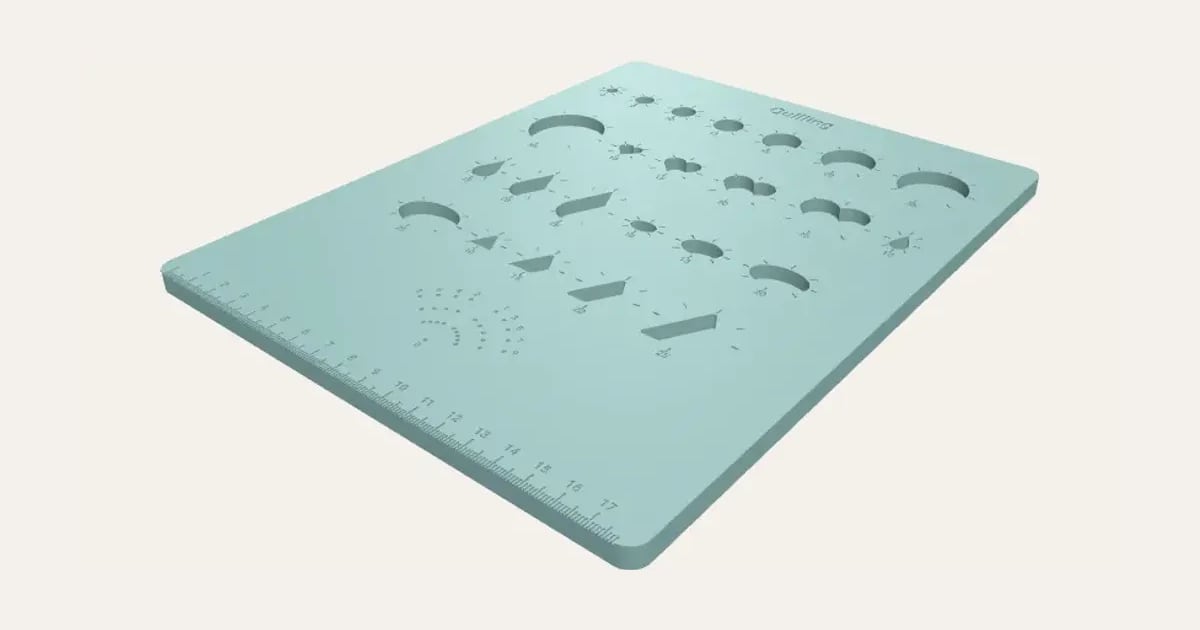
A quilling board: wells for circles, hearts, teardrops, ovals, triangles and more, each size engraved with marks round it for even pinches, a numbered husking pin guide and a ruler. Cut right through to use over a cork tile.
Customise it in your browser, then download a print-ready STL, or a multi-colour 3MF. No CAD skills needed.
About the Paper Quilling Board
A board for paper quilling: drop a freshly rolled coil into a well and let it spring open to fill it, so every coil of a size comes out the same, then pinch it to shape. Circles in a run of sizes, and hearts, teardrops, ovals, triangles, half circles and squares, each with its size and eight little marks round it to space your pinches evenly. A numbered pin guide for husking, and a millimetre ruler along the front.
What you can change
- Type your own circle sizes, other shapes’ sizes and title along the top.
- Pick its colour.
- Turn on or off: hearts, teardrops, ovals and triangles.
What you download
An STL or 3MF for any slicer.
Printing it
Prints flat with no supports. With the shapes cut right through, lay the board on a cork tile or a piece of foam board and pin your coils as they dry. The husking guide’s pin holes are a snug fit for dressmaking pins. The ruler’s marks are every millimetre, numbered every centimetre.
Ideas for using it
- Matching coils for quilled flowers and cards.
- A starter kit for a quilling class.
- A neat set for a craft room.
Questions
Which sizes?
Any you like: type them in millimetres. The default set runs from 5 to 28 mm, the usual range for cards and flowers.
Should the wells go right through?
Either: with floors, coils stay flat and can’t unwind out of the bottom. Cut right through, lay the board on a cork tile or foam board and pin coils in place while the glue dries, like shop-bought boards.
What’s the pin guide for?
Husking: push pins into the numbered holes and wind a strip round them in order (0 and 1, then 0 and 2, and so on) to build up wheatear loops of an even size.
Which printers and slicers does it work with?
Any FDM printer. The STL opens in every slicer; the 3MF keeps the colours as separate parts in Bambu Studio, Orca Slicer, PrusaSlicer and Cura. Pick your printer in the designer to check it fits the plate.
Can I sell what I make?
On Pro and Ultimate you can sell the prints you make, for example on Etsy or at craft fairs, for as long as your membership is active: if it ends, stop selling them. On Free and Maker, print it for yourself or give it as a gift. The STL and 3MF files themselves are never for sharing or selling.
More Crafting & helpers
- T-Spacers
- Cane Slicing Guide
- Clay Thickness Guides
- Clay Depth Guide Tray and Stand
- Round Bead Roller
- Alphabet Stamp Set
- Clay Cutter Set
- Earring Display Cards
- Texture Roller and Mat
- Pottery Rib Set
- Seam and Hem Gauge
- Knitting Needle and Crochet Hook Gauge
- Thread and Bobbin Organiser
- Embroidery Hoop Stand
- Paint Bottle and Brush Organiser
- Glue Gun and Craft Knife Stand
- Washi Tape Dispenser
- Watercolour Palette
- Name Stencils
- Bead Design Board
- Silicone Mould Box
- Laser-Cut Frame Weaving Loom
- Laser-Cut Ribbon and Vinyl Roll Rack
- Ribbon and Vinyl Roll Rack
- Pom-Pom and Tassel Maker Set
- Frame Weaving Loom
- Paintbrush Drying Rack
- Diamond Painting Drill Tray Rack
- Diamond Painting Drill Trays
- Diamond Painting Drill Organiser
- Diamond Painting Multi-Placer Tips
- Diamond Painting Canvas Roller Stand
- Yarn Bowl
- Stitch Markers
- Yarn Guide Ring
- Sewing Pattern Weights
- Pin Cushion Caddy
- Sewing Machine Thread Stand
- Quilting Templates
- Sewing Patterns
- Cross-Stitch, C2C and Knitting Charts
- QR Code Sign
- Price Tags
- Keyring Display Rack