Filamora Studios › Crafting & helpers
Watercolour Palette
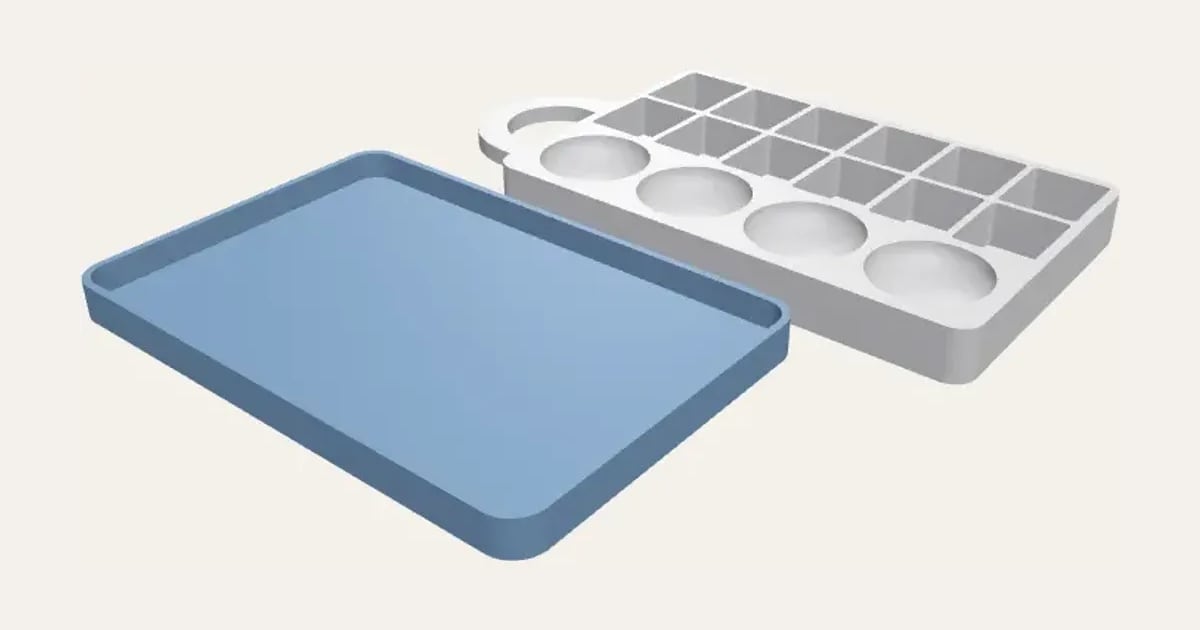
A watercolour palette with wells for half or full pans, round mixing wells, a thumb hole to hold it by, and a push-on lid with your name.
Customise it in your browser, then download a print-ready STL, or a multi-colour 3MF. No CAD skills needed.
About the Watercolour Palette
A palette for watercolour pans: a grid of wells that half pans or full pans press into, round mixing wells along the front, a thumb hole for holding it while you paint, and a lid that pushes on over it with your name. Choose how many pans across and how many rows.
What you can change
- Type your own name on the lid.
- Font: 29 to choose from, from script to stencil.
- Pans: half pans and full pans.
- Pick the palette and lid colours.
- Adjust pans across, rows of pans, mixing wells and lid fit: gap round the palette.
- Turn on or off: thumb hole and lid.
What you download
An STL for any slicer, and a 3MF with each colour as its own part, ready for an AMS or a filament change.
Printing it
Prints with no supports: the palette the right way up, the lid upside down. White or a light colour shows paint colours truly. Pans press into the wells; a dab of Blu Tack holds them if they’re loose. If the lid is loose or tight on your printer, change its fit by 0.05 mm at a time and print just the lid again.
Ideas for using it
- A travel set for painting outdoors.
- Fill it with your own colours poured into empty pans.
- A gift for someone starting watercolour.
Questions
Which pans fit?
Standard half pans (about 16 × 19 mm) or full pans (19 × 31 mm). Choose which in the settings; the wells are 0.4 mm bigger so they press in.
Can I mix on the lid?
Yes: the inside of the lid is flat, so it makes a second mixing tray.
Do I need a multi-colour printer?
No. Print it in one colour, or in colours with a filament change: the Colours line under the 3D view says at which height to change. With an AMS or another multi-colour printer, the 3MF prints it in one go.
Which printers and slicers does it work with?
Any FDM printer. The STL opens in every slicer; the 3MF keeps the colours as separate parts in Bambu Studio, Orca Slicer, PrusaSlicer and Cura. Pick your printer in the designer to check it fits the plate.
Can I sell what I make?
On Pro and Ultimate you can sell the prints you make, for example on Etsy or at craft fairs, for as long as your membership is active: if it ends, stop selling them. On Free and Maker, print it for yourself or give it as a gift. The STL and 3MF files themselves are never for sharing or selling.
More Crafting & helpers
- T-Spacers
- Cane Slicing Guide
- Clay Thickness Guides
- Clay Depth Guide Tray and Stand
- Round Bead Roller
- Alphabet Stamp Set
- Clay Cutter Set
- Earring Display Cards
- Texture Roller and Mat
- Pottery Rib Set
- Seam and Hem Gauge
- Knitting Needle and Crochet Hook Gauge
- Thread and Bobbin Organiser
- Embroidery Hoop Stand
- Paint Bottle and Brush Organiser
- Glue Gun and Craft Knife Stand
- Washi Tape Dispenser
- Diamond Painting Drill Tray Rack
- Diamond Painting Drill Trays
- Diamond Painting Drill Organiser
- Diamond Painting Multi-Placer Tips
- Diamond Painting Canvas Roller Stand
- Yarn Bowl
- Stitch Markers
- Yarn Guide Ring
- Sewing Pattern Weights
- Pin Cushion Caddy
- Sewing Machine Thread Stand
- Quilting Templates