Filamora Studios › Crafting & helpers
Bead Design Board
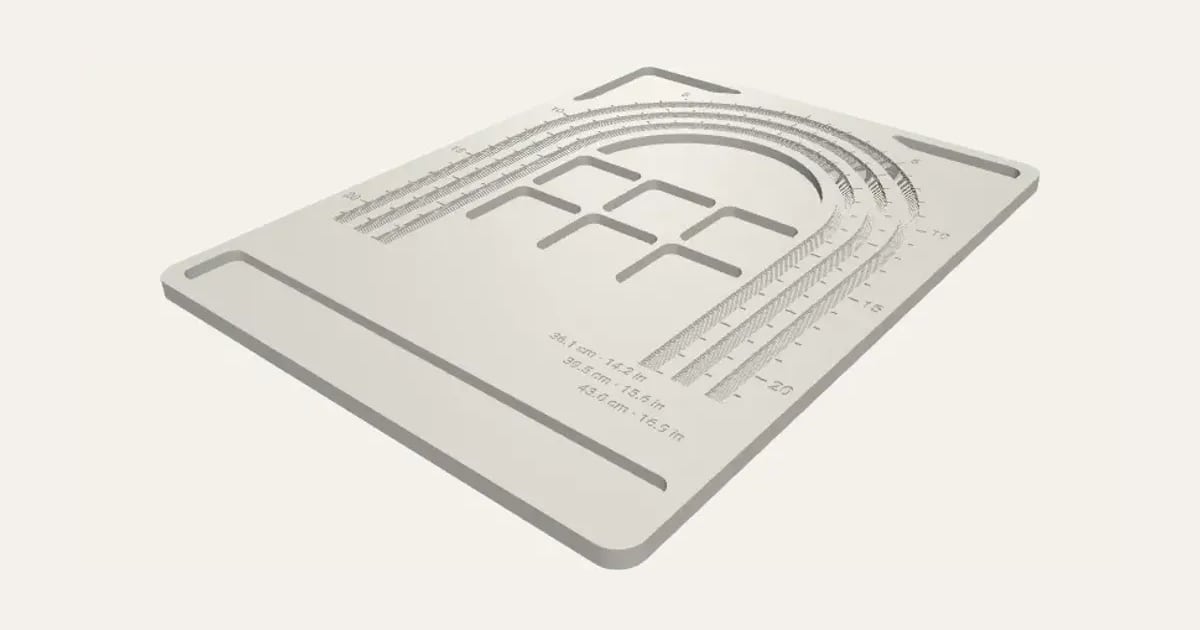
A bead design board: U-shaped channels marked every centimetre to lay out necklaces and bracelets before stringing, each length engraved, with trays for loose beads.
Customise it in your browser, then download a print-ready STL, or a multi-colour 3MF. No CAD skills needed.
About the Bead Design Board
A board for laying out a necklace or bracelet before you string it: U-shaped channels marked every centimetre from the middle outwards, with each channel’s length engraved at its ends, and trays inside the U for the loose beads. Set the number of channels and their size.
What you can change
- Marks in: centimetres and inches.
- Pick the board and marks and numbers colours.
- Adjust channels, inner curve radius, straight legs and bead trays inside.
- Turn on or off: round-bottomed channels, long necklace loop, more trays in the spare space and marks and numbers in a second colour.
What you download
An STL for any slicer, and a 3MF with each colour as its own part, ready for an AMS or a filament change.
Printing it
Prints flat with no supports. Each channel’s length is engraved at the ends of its legs, in both units; the marks count out from the middle of the curve, so lay the centre bead at 0 and the clasp at the ends. The long loop (if chosen) goes right round, meeting at the bottom: half the necklace each side. A light colour with a matt plate keeps beads from rolling about. With the marks in a second colour they’re inlaid flush: change filament at the top layers, or let the AMS.
Ideas for using it
- Designing necklaces for a craft stall.
- Planning a bracelet pattern with a child.
- A gift with a box of beads.
Questions
How long are the channels?
Each one’s whole length is engraved at the end of its legs. The defaults make three channels of about 36, 40 and 43 cm, the common necklace lengths; switch on the long loop for longer ones.
Where do I start?
Put the centre bead at the top of the curve (0) and work out towards the ends; the clasp goes where the length you want is marked.
Do I need a multi-colour printer?
No. Print it in one colour, or in colours with a filament change: the Colours line under the 3D view says at which height to change. With an AMS or another multi-colour printer, the 3MF prints it in one go.
Which printers and slicers does it work with?
Any FDM printer. The STL opens in every slicer; the 3MF keeps the colours as separate parts in Bambu Studio, Orca Slicer, PrusaSlicer and Cura. Pick your printer in the designer to check it fits the plate.
Can I sell what I make?
On Pro and Ultimate you can sell the prints you make, for example on Etsy or at craft fairs, for as long as your membership is active: if it ends, stop selling them. On Free and Maker, print it for yourself or give it as a gift. The STL and 3MF files themselves are never for sharing or selling.
More Crafting & helpers
- T-Spacers
- Cane Slicing Guide
- Clay Thickness Guides
- Clay Depth Guide Tray and Stand
- Round Bead Roller
- Alphabet Stamp Set
- Clay Cutter Set
- Earring Display Cards
- Texture Roller and Mat
- Pottery Rib Set
- Seam and Hem Gauge
- Knitting Needle and Crochet Hook Gauge
- Thread and Bobbin Organiser
- Embroidery Hoop Stand
- Paint Bottle and Brush Organiser
- Glue Gun and Craft Knife Stand
- Washi Tape Dispenser
- Watercolour Palette
- Name Stencils
- Diamond Painting Drill Tray Rack
- Diamond Painting Drill Trays
- Diamond Painting Drill Organiser
- Diamond Painting Multi-Placer Tips
- Diamond Painting Canvas Roller Stand
- Yarn Bowl
- Stitch Markers
- Yarn Guide Ring
- Sewing Pattern Weights
- Pin Cushion Caddy
- Sewing Machine Thread Stand
- Quilting Templates
- Sewing Patterns
- Cross-Stitch, C2C and Knitting Charts