Filamora Studios › Crafting & helpers
Keyring Display Rack
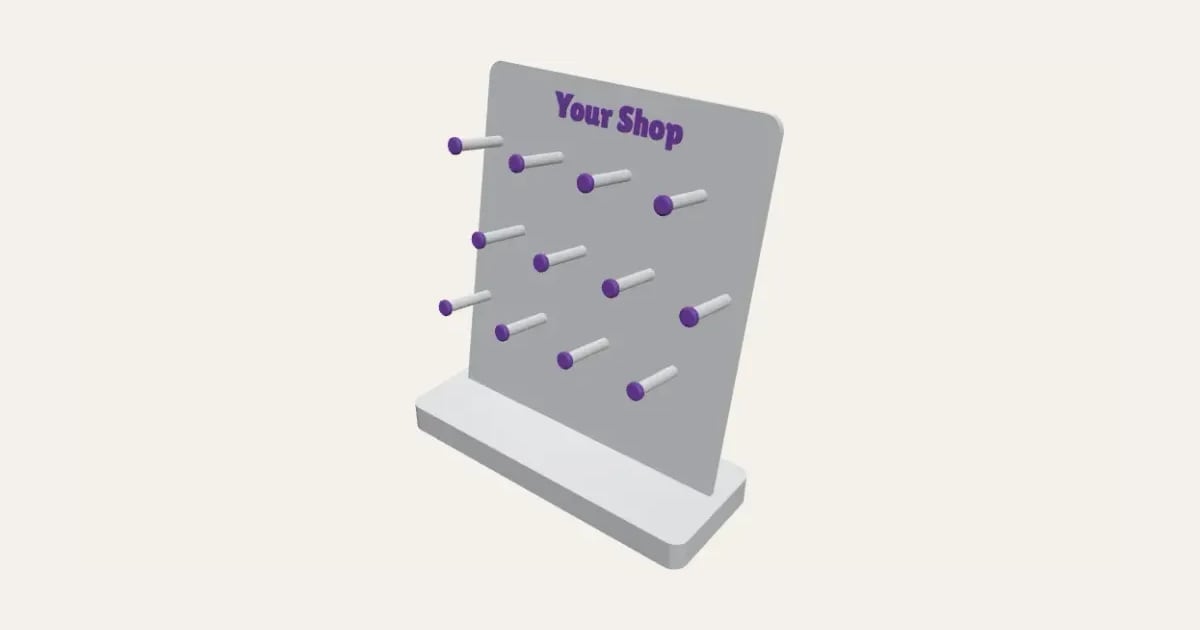
A rack for selling keyrings and bag charms: staggered rows of pegs with knobs on their ends, your shop’s name or logo across the top, leaning back in a sturdy base.
Customise it in your browser, then download a print-ready STL, or a multi-colour 3MF. No CAD skills needed.
About the Keyring Display Rack
A keyring display rack for a stall or shop counter: a board of pegs in staggered rows, each with a knob on its end so keyrings and bag charms stay on, standing in a base and leaning back a little, with your shop’s name or logo raised across the top.
What you can change
- Type your own across the top, QR code in the corner (optional): a link to your shop or socials and small words in the corner.
- Add your own logo beside it.
- Font: 30 to choose from, from script to stencil.
- All 5 colours are yours to pick.
- Adjust QR code size, width, rows of pegs and pegs in a row, and more.
- Turn on or off: my logo is light on a dark background.
What you download
An STL for any slicer, and a 3MF with each colour as its own part, ready for an AMS or a filament change.
Printing it
The board prints lying down with its pegs pointing up, no supports. The pegs’ ends are the top layers, so their colour is just a filament change near the end; the name is raised on its face, so it needs a multi-colour printer (AMS) to be a second colour, or print it all in one. The board slots into the base, leaning back so keyrings stay on the pegs.
Questions
How many keyrings will it hold?
Each peg holds several, depending on its length: three rows of four 35 mm pegs shows 12 designs and holds plenty more behind them.
Does it fit my printer?
The board and base lie flat on a 256 mm plate at the default size; make it narrower for a smaller printer.
Will it tip over?
The base reaches well forward under the pegs and the board leans back, so it stays put with a full load.
Do I need a multi-colour printer?
No. Print it in one colour, or in colours with a filament change: the Colours line under the 3D view says at which height to change. With an AMS or another multi-colour printer, the 3MF prints it in one go.
Which printers and slicers does it work with?
Any FDM printer. The STL opens in every slicer; the 3MF keeps the colours as separate parts in Bambu Studio, Orca Slicer, PrusaSlicer and Cura. Pick your printer in the designer to check it fits the plate.
Can I sell what I make?
On Pro and Ultimate you can sell the prints you make, for example on Etsy or at craft fairs, for as long as your membership is active: if it ends, stop selling them. On Free and Maker, print it for yourself or give it as a gift. The STL and 3MF files themselves are never for sharing or selling.
More Crafting & helpers
- T-Spacers
- Cane Slicing Guide
- Clay Thickness Guides
- Clay Depth Guide Tray and Stand
- Round Bead Roller
- Alphabet Stamp Set
- Clay Cutter Set
- Earring Display Cards
- Texture Roller and Mat
- Pottery Rib Set
- Seam and Hem Gauge
- Knitting Needle and Crochet Hook Gauge
- Thread and Bobbin Organiser
- Embroidery Hoop Stand
- Paint Bottle and Brush Organiser
- Glue Gun and Craft Knife Stand
- Washi Tape Dispenser
- Watercolour Palette
- Name Stencils
- Bead Design Board
- Silicone Mould Box
- Laser-Cut Frame Weaving Loom
- Laser-Cut Ribbon and Vinyl Roll Rack
- Ribbon and Vinyl Roll Rack
- Pom-Pom and Tassel Maker Set
- Frame Weaving Loom
- Diamond Painting Drill Tray Rack
- Diamond Painting Drill Trays
- Diamond Painting Drill Organiser
- Diamond Painting Multi-Placer Tips
- Diamond Painting Canvas Roller Stand
- Yarn Bowl
- Stitch Markers
- Yarn Guide Ring
- Sewing Pattern Weights
- Pin Cushion Caddy
- Sewing Machine Thread Stand
- Quilting Templates
- Sewing Patterns
- Cross-Stitch, C2C and Knitting Charts
- QR Code Sign
- Price Tags