Filamora Studios › Home & garden
Laser-Cut Coasters
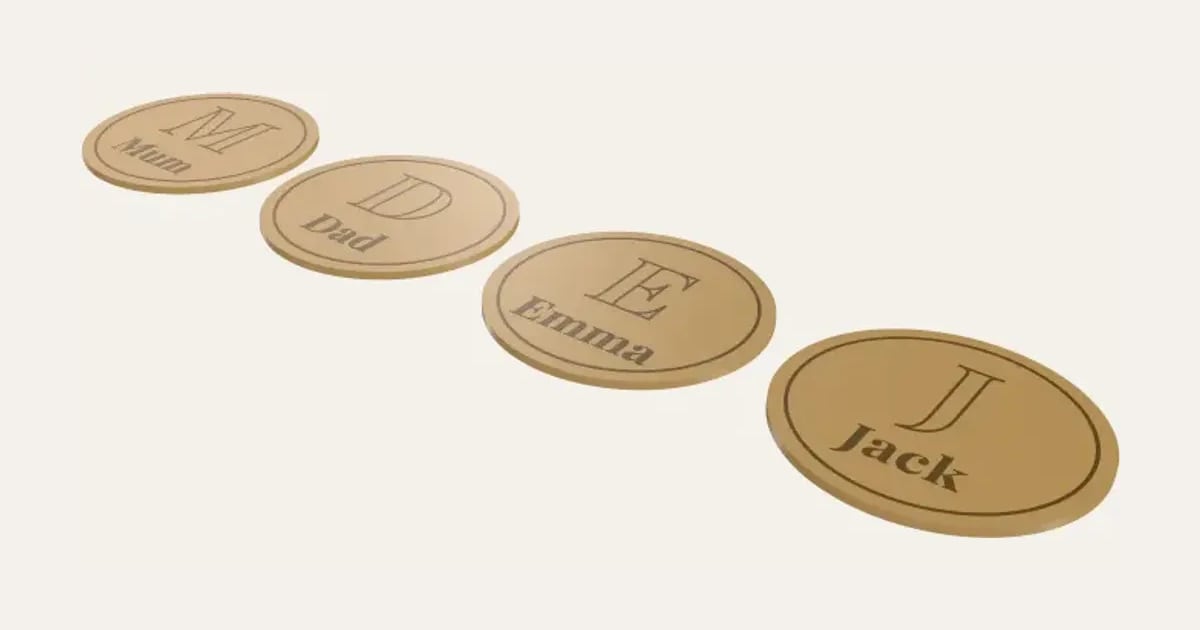
A set of coasters with a name and a big initial engraved on each, round, square or hexagonal.
Customise it in your browser, then download a print-ready PDF to print at home. No design skills needed.
About the Laser-Cut Coasters
A set of laser-cut coasters, a name or word on each with a big initial behind it and a border, round, square or hexagonal. A family set, or Cheers in four languages.
What you can change
- Type your own names or words.
- Shape: round, square and hexagon.
- Font: 35 to choose from, from script to stencil.
- Sheet size: 300 × 300 mm, 400 × 300 mm, 20 × 12 in, 600 × 400 mm and my own size.
- Pick the material colour.
- Adjust across, sheet thickness and kerf.
- Turn on or off: A big initial behind each name.
What you download
.
Printing it
Untested: we don’t have a laser cutter yet, so this hasn’t been cut on a real machine. Cut one first. Cut them from 3 mm birch ply, oak veneer ply or slate-look acrylic, the names and border engraved. Seal wooden ones with a food-safe finish, and stick felt dots or a cork sheet on the back. In the SVG, red hairlines are to cut and black fills to engrave.
Questions
What do I cut them from?
3 mm birch or oak ply, or slate-look acrylic. Seal wooden ones with a food-safe finish and add felt or cork underneath.
How many can I make?
Up to twelve, one a line.
Can I sell what I make?
On Pro and Ultimate you can sell the prints you make, for example on Etsy or at craft fairs, for as long as your membership is active: if it ends, stop selling them. On Free and Maker, print it for yourself or give it as a gift. The PDF itself is never for sharing or selling.
More Home & garden
- Plant Pot
- Name Cookie Cutter
- House Number Plaque
- Plant Markers
- Coaster Set
- Twisted Vase
- Organic Book Holder
- Sunglasses Stand
- Floating Book Display
- Shelf-Edge Book Display
- Book and Coffee Stand
- Can Holder with Handle
- Door Stop
- Ridge Bag Clip
- Name Wall Hooks
- Ridge Wall Hooks
- Ridge Shower Hook
- Ridge Door Hook
- Ridge Slide Clip
- Ridge Hanger Hook
- Ridge Toothpaste Squeezer
- Ribbed Pumpkin
- Pet Bowl Stand
- Ridge Plant Hanger
- Halloween Garland
- Medal Hanger
- Family Toothbrush Holder
- Poop-Bag Holder
- Tilted Desk Organiser
- Cookie Stamp
- 45 Record Adapter
- Record Wall Mount
- Charger and Cable Labels
- Laser-Cut Now Playing Stand
- Now Playing Record Holder
- Jewellery Stand
- Terrain Relief
- Heart Photo Frame
- Ribbed Pot Vase
- Ribbed Capsule Vase
- Ribbed Bottle Vase
- Ribbed Teardrop Vase
- Ribbed Pod Vase
- Mug Shelf
- US Road Sign
- Funny Signs
- Laser-Cut Height Chart
- Personalised Cabinet Knobs
- Family Key Rack
- Initial Bookends
- Moon & Planet Lamp