Filamora Studios › Home & garden
House Number Plaque
A big house number with the street name under it, framed on a rounded, oval, arched or railway-style plaque. Screw holes or tape.
Customise it in your browser, then download a print-ready STL, or a multi-colour 3MF. No CAD skills needed.
About the House Number Plaque
A house number plaque with a big number and the street name underneath, framed on a rounded, oval, arched or railway-style plaque. Screw it up through countersunk holes or fix it with outdoor tape.
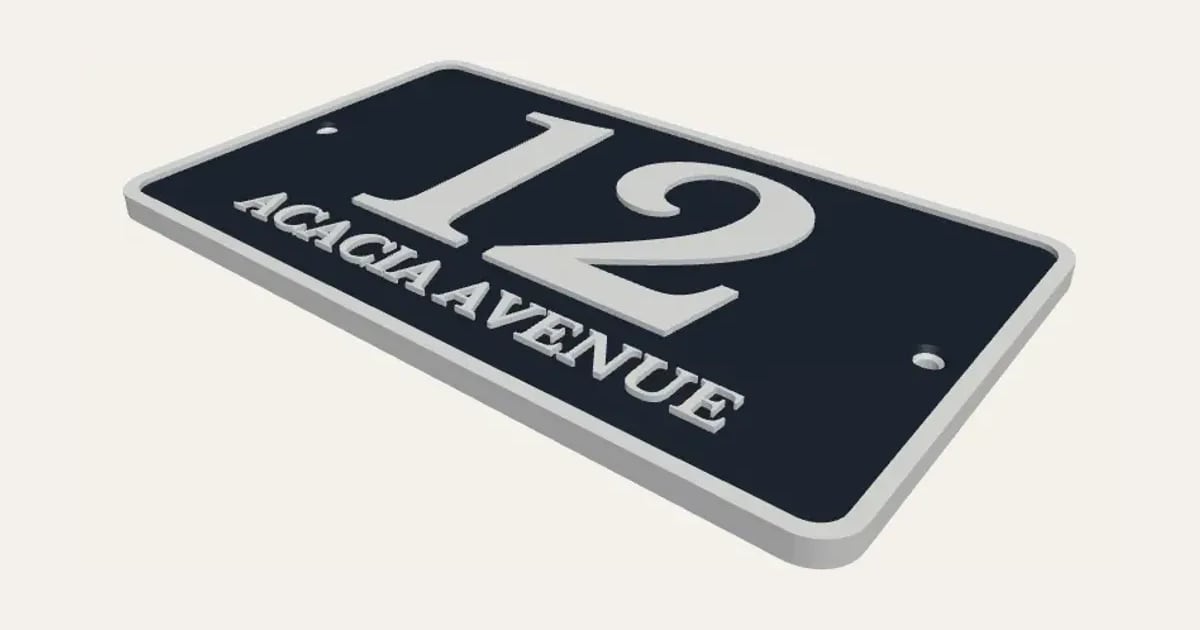
What you can change
- Type your own house number or name, after the number and street name.
- Font: 26 to choose from, from script to stencil.
- Sign size: fit to the text and custom width and height.
- Corners: notched, rounded, square, oval and arched top.
- Fixing: two countersunk screw holes and none.
- Pick the border, panel and letter colours.
- Adjust superscript size, number height, street name letter height and gap between the lines, and more.
- Turn on or off: raised border.
Size
About 16.6 × 10 × 0.5 cm (width × depth × height), one piece at the starting settings.
What you download
An STL for any slicer, and a 3MF with each colour as its own part, ready for an AMS or a filament change.
Printing it
About 65 g of PLA and about 3 hours 50 minutes to print, one piece at the starting settings (15% infill, 2 walls, 0.2 mm layers, on a Bambu Lab A1). Your slicer gives the exact figures for your printer and settings.
Ideas for using it
- A front door or gatepost number in colours that match the door.
- A housewarming gift for someone who’s just moved.
- Mark flats, outbuildings or an annexe so deliveries find them.
- A number for a wheelie bin or a postbox.
Questions
What size is it?
About 16.6 × 10 × 0.5 cm (width × depth × height), one piece at the starting settings. Every size is a setting, so make it as big or small as you need.
Do I need a multi-colour printer?
No. Print it in one colour, or in colours with a filament change: the Colours line under the 3D view says at which height to change. With an AMS or another multi-colour printer, the 3MF prints it in one go.
Which printers and slicers does it work with?
Any FDM printer. The STL opens in every slicer; the 3MF keeps the colours as separate parts in Bambu Studio, Orca Slicer, PrusaSlicer and Cura. Pick your printer in the designer to check it fits the plate.
Can I sell what I make?
On Pro and Ultimate you can sell the prints you make, for example on Etsy or at craft fairs. On Free and Maker, print it for yourself or give it as a gift. The STL and 3MF files themselves are never for sharing or selling.
More Home & garden
- Plant Pot
- Name Cookie Cutter
- Plant Markers
- Coaster Set
- Twisted Vase
- Ridge Bag Clip
- Name Wall Hooks
- Ridge Wall Hooks
- Ridge Shower Hook
- Ridge Door Hook
- Ridge Slide Clip
- Ridge Hanger Hook
- Ridge Toothpaste Squeezer
- Ribbed Pumpkin
- Pet Bowl Stand
- Ridge Plant Hanger
- Halloween Garland
- Medal Hanger
- Family Toothbrush Holder
- Poop-Bag Holder
- Tilted Desk Organiser
- Cookie Stamp
- Jewellery Stand
- Terrain Relief