Filamora Studios › Home & garden
Door Stop
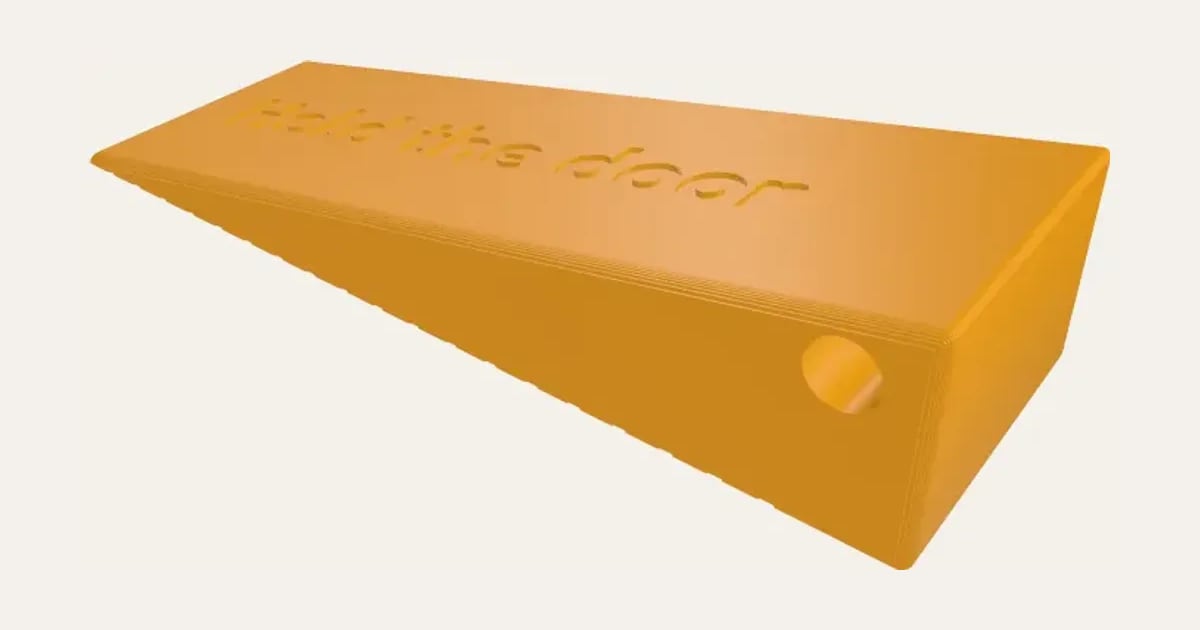
A wedge door stop with a name or word along its slope, grip grooves underneath and a hole to hang it up. Or a cheese wedge with holes.
Customise it in your browser, then download a print-ready STL, or a multi-colour 3MF. No CAD skills needed.
About the Door Stop
A wedge to hold a door open, with a name or word along its slope, grip grooves underneath, and a hole in the tall end to hang it on a hook. Or a cheese wedge with holes through it, for fun.
What you can change
- Type your own name or word on the slope.
- Shape: wedge and cheese wedge.
- Font: 35 to choose from, from script to stencil.
- Words: engraved and inlaid in a second colour.
- Pick its colour.
- Adjust length, width and height at the tall end.
- Turn on or off: grip grooves underneath and hole to hang it up.
What you download
An STL for any slicer, and a 3MF with each colour as its own part, ready for an AMS or a filament change.
Printing it
Prints on its base, slope up, with no supports. TPU (95A) grips the floor best and won’t mark it; PLA or PETG work too, with the grip grooves. Measure the gap under your door: the wedge’s tall end should be a little more.
Ideas for using it
- A name for a child’s bedroom door.
- Hold the door for a fire-safe kitchen.
- A cheese wedge for the pantry.
On our blog: PLA, PETG or TPU? Which filament for which gift
Questions
What filament is best?
TPU grips the floor and won’t mark it. PLA and PETG work too, with the grip grooves.
How tall should it be?
A little more than the gap under your door, so it wedges in.
Do I need a multi-colour printer?
No. Print it in one colour, or in colours with a filament change: the Colours line under the 3D view says at which height to change. With an AMS or another multi-colour printer, the 3MF prints it in one go.
Which printers and slicers does it work with?
Any FDM printer. The STL opens in every slicer; the 3MF keeps the colours as separate parts in Bambu Studio, Orca Slicer, PrusaSlicer and Cura. Pick your printer in the designer to check it fits the plate.
My 3MF opens all grey in Bambu Studio. What do I do?
Download the 3MF again: files made before 3 November 2026 open in one colour in Bambu Studio 2.9 and later. A new one brings its colours, and Bambu Studio asks you to match each to one of your filaments. With an older file, File → Import → Import 3D Models (Ctrl+I) often keeps the colours, or select each part and press 1, 2, 3… to put it on that filament.
Can I sell what I make?
On Pro and Ultimate you can sell the prints you make, for example on Etsy or at craft fairs, for as long as your membership is active: if it ends, stop selling them. On Free and Maker, print it for yourself or give it as a gift. The STL and 3MF files themselves are never for sharing or selling.
More Home & garden
- Plant Pot
- Name Cookie Cutter
- House Number Plaque
- Plant Markers
- Coaster Set
- Twisted Vase
- Organic Book Holder
- Sunglasses Stand
- Floating Book Display
- Shelf-Edge Book Display
- Book and Coffee Stand
- Can Holder with Handle
- Ridge Bag Clip
- Name Wall Hooks
- Ridge Wall Hooks
- Ridge Shower Hook
- Ridge Door Hook
- Ridge Slide Clip
- Ridge Hanger Hook
- Ridge Toothpaste Squeezer
- Ribbed Pumpkin
- Pet Bowl Stand
- Ridge Plant Hanger
- Halloween Garland
- Medal Hanger
- Family Toothbrush Holder
- Poop-Bag Holder
- Tilted Desk Organiser
- Cookie Stamp
- 45 Record Adapter
- Record Wall Mount
- Charger and Cable Labels
- Laser-Cut Now Playing Stand
- Now Playing Record Holder
- Jewellery Stand
- Terrain Relief
- Heart Photo Frame
- Ribbed Pot Vase
- Ribbed Capsule Vase
- Ribbed Bottle Vase
- Ribbed Teardrop Vase
- Ribbed Pod Vase
- Mug Shelf
- US Road Sign
- Funny Signs
- Laser-Cut Coasters
- Laser-Cut Height Chart
- Personalised Cabinet Knobs
- Family Key Rack
- Initial Bookends
- Moon & Planet Lamp