Filamora Studios › Home & garden
Terrain Relief
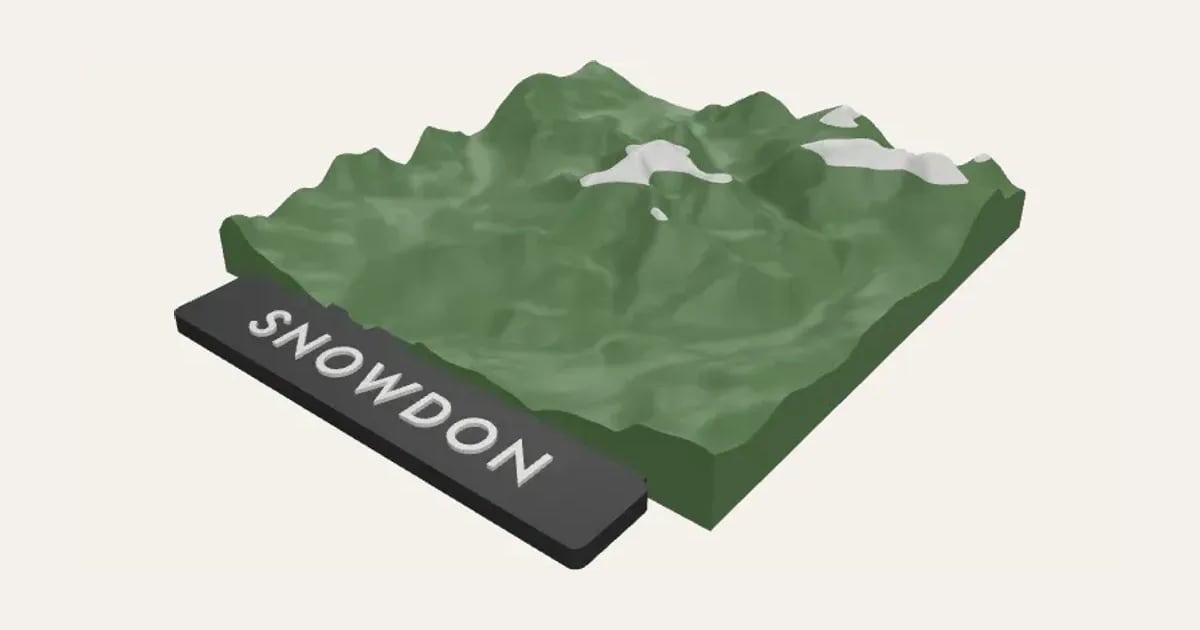
The hills and valleys round a place as a raised 3D tile, from real height data, with its name along the front and its peaks in a second colour. Square, round or hexagonal.
Customise it in your browser, then download a print-ready STL, or a multi-colour 3MF. No CAD skills needed.
About the Terrain Relief
A 3D terrain relief: the hills and valleys round a place, from real height data, as a raised tile with its name along the front and its peaks in a second colour. A mountain you’ve climbed, a holiday or home. Square, round or hexagonal.
What you can change
- Type your own name along the front.
- Pick the place: search for it, paste coordinates or a map link, or use where you are.
- Shape: square, round and hexagon.
- Font: 26 to choose from, from script to stencil.
- Pick the land, peaks, name strip and name colours.
- Adjust latitude, longitude, how far it reaches and size across, and more.
Size
About 12 × 13.9 × 2.3 cm (width × depth × height), one piece at the starting settings.
What you download
An STL for any slicer, and a 3MF with each colour as its own part, ready for an AMS or a filament change.
Printing it
About 66 g of PLA and about 3 hours 50 minutes to print, one piece at the starting settings (15% infill, 2 walls, 0.2 mm layers, on a Bambu Lab A1). Your slicer gives the exact figures for your printer and settings.
Prints flat with no supports; set the filament to change at the height where the colour changes (or let the AMS), and again for the name. Heights from the Terrain Tiles on AWS (Mapzen Terrarium: SRTM, GMTED, ETOPO and others). Stretching the heights makes gentle hills show; mountains look right at about 1.5×.
Questions
Where do the heights come from?
The Terrain Tiles on AWS (Mapzen’s Terrarium heights, from SRTM, GMTED and ETOPO), loaded for the place you choose.
Why stretch the heights?
At true scale gentle hills hardly show. Stretch them 2 or 3 times for hills, about 1.5 times for mountains.
What size is it?
About 12 × 13.9 × 2.3 cm (width × depth × height), one piece at the starting settings. Every size is a setting, so make it as big or small as you need.
Do I need a multi-colour printer?
No. Print it in one colour, or in colours with a filament change: the Colours line under the 3D view says at which height to change. With an AMS or another multi-colour printer, the 3MF prints it in one go.
Which printers and slicers does it work with?
Any FDM printer. The STL opens in every slicer; the 3MF keeps the colours as separate parts in Bambu Studio, Orca Slicer, PrusaSlicer and Cura. Pick your printer in the designer to check it fits the plate.
Can I sell what I make?
On Pro and Ultimate you can sell the prints you make, for example on Etsy or at craft fairs. On Free and Maker, print it for yourself or give it as a gift. The STL and 3MF files themselves are never for sharing or selling.
More Home & garden
- Plant Pot
- Name Cookie Cutter
- House Number Plaque
- Plant Markers
- Coaster Set
- Twisted Vase
- Ridge Bag Clip
- Name Wall Hooks
- Ridge Wall Hooks
- Ridge Shower Hook
- Ridge Door Hook
- Ridge Slide Clip
- Ridge Hanger Hook
- Ridge Toothpaste Squeezer
- Ribbed Pumpkin
- Pet Bowl Stand
- Ridge Plant Hanger
- Halloween Garland
- Medal Hanger
- Family Toothbrush Holder
- Poop-Bag Holder
- Tilted Desk Organiser
- Cookie Stamp
- Jewellery Stand