Filamora Studios › Personalised
Laser-Cut Crossword Sign
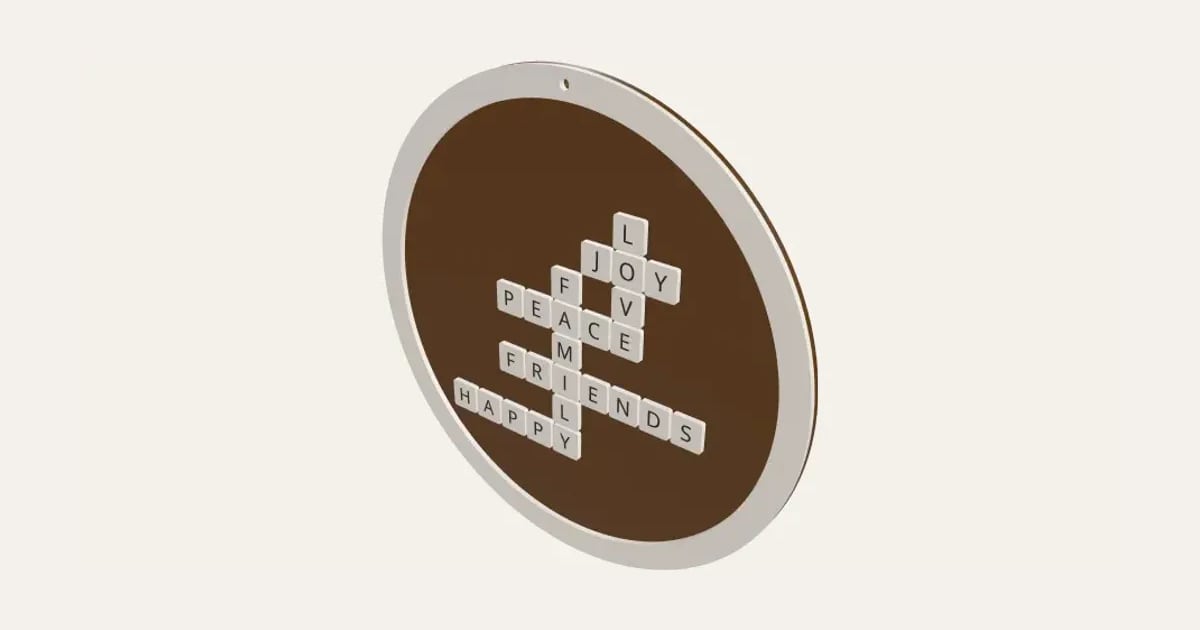
A crossword sign to laser cut: your words or the family’s names crossing as letter tiles on a round or square board inside a frame, with a hanging hole. Tiles and frame in a light material glued onto a dark board over engraved guides, or all engraved on one. A name along the bottom and a paw tile for the pet. Not yet tested on a laser.
Customise it in your browser, then download a print-ready PDF to print at home. No design skills needed.
About the Laser-Cut Crossword Sign
A crossword sign to cut on a laser: your words or the family’s names crossing where they share a letter, as letter tiles on a round or square board inside a frame, with a hole to hang it up. The tiles and frame are cut from one material (a light wood, or white acrylic) and glued onto a darker board over faint engraved guides, or everything can be engraved on one board instead. Add a name along the bottom, letter values on the tiles, and a paw tile for the pet. Shuffle for another layout. It comes as an SVG for LightBurn, xTool Creative Space, Glowforge and other laser software, each material on its own sheets. Please note: we don’t have a laser cutter yet, so this hasn’t been tried on a real machine.
What you can change
- Type your own words or names and name along the bottom.
- Its font: 30 to choose from, from script to stencil.
- Name at the: bottom and top.
- Style: letter tiles to glue on, the crossword in one piece to glue on and all engraved on one board.
- Tile letters font: 30 to choose from, from script to stencil.
- Board: round and square.
- Sheet size: 300 × 300 mm, 400 × 300 mm, 20 × 12 in, 600 × 400 mm and my own size.
- Pick the board and tiles and frame colours.
- Adjust shuffle, name size, move the name right and move the name up, and more.
- Turn on or off: letter values on the tiles, frame round the edge, hanging hole and faint guides on the board to line the tiles up.
What you download
.
Printing it
Untested: we don’t have a laser cutter yet, so this hasn’t been cut on a real machine. Cut a small one first. The tiles and frame come on their own sheets (cut them from a light wood, or white acrylic or painted MDF) and the board from a darker one; the SVG says which is which. In the SVG, red hairlines cut, blue hairlines score (a light single pass: the guides and squares) and black fills engrave (the letters). Score and engrave before you cut. Glue the tiles over the faint squares on the board, and the frame round the edge.
Ideas for using it
- A family names sign for the hall, with the pet’s name ending in a paw.
- Love, Joy, Peace and Home as a housewarming present.
- A wedding or anniversary sign with the couple’s names and the date.
- A classroom sign with every child’s name, as a leaving present for a teacher.
- A stock item for a craft stall in a few popular word sets.
Questions
Has this been tested?
Not on a laser yet: we don’t have one. The tiles are checked on screen to sit inside the frame without touching, but please cut a small one first and tell us how it comes out.
A name was left off
A word has to share a letter with one already down to cross it. Try Shuffle for another layout, or another spelling, or add a word that links them.
Which material for which pieces?
The board on one sheet (walnut, or a dark stained ply), and the tiles and frame on their own sheets (birch, maple, white acrylic or painted MDF). The designer and the SVG say which sheet is which.
How do I line the tiles up?
Faint squares are engraved on the board where each tile goes. Glue them on with wood glue (or CA glue for acrylic), then the frame round the edge.
Can I make it as one piece?
Two ways: “The crossword in one piece” cuts all the tiles joined together, with the squares scored between them, so there’s one piece to glue and it lines itself up; or “All engraved on one board” engraves the tiles’ outlines and letters straight onto it.
Which lines cut, score and engrave?
In the SVG, red hairlines are cut lines, blue hairlines are score lines (traced once, lightly: the guides and the squares’ outlines) and black filled shapes are engraving (the letters). Set those three in your laser software; LightBurn, xTool Creative Space and Glowforge all sort them by colour.
Can I sell what I make?
On Pro and Ultimate you can sell the prints you make, for example on Etsy or at craft fairs, for as long as your membership is active: if it ends, stop selling them. On Free and Maker, print it for yourself or give it as a gift. The PDF itself is never for sharing or selling.
More Personalised
- Name Plate
- Name Keyring
- Stepped Name Keyring
- Street Sign
- Number Plate Keyring
- Name Desk Tidy
- Initial & Name
- Door Sign
- Christmas Ornaments
- Gift Tags
- Pet Tags
- Cake Topper
- Place Cards
- Halloween Decorations
- Table Numbers
- Name Puzzle
- Lithophane
- Bookmarks
- Gym Weight Plate Keyring
- Mini A-Frame Sign
- Miniature Street Name Signs
- Book Page Holder
- Laser-Cut Name Sign
- Name Fridge Magnets
- Trinket Dish
- Personalise Your Model
- Name Lantern
- Name Train
- Name Bunting
- Name Pencil Toppers
- Word Cloud
- Map Plaque
- Name Bracelet
- Luggage Tag
- Pet Memorial Plaque
- Tooth Fairy Box
- Lithophane Lamp
- Lanyard Name Badge
- Paracord Letter Beads
- Dog Treat Pot
- Tumbler Lip Balm Holder
- Cable Winder Keyring
- Coin Bottle Opener Keyring
- Pet Food Scoop
- Golf Divot Tool and Ball Marker
- Drink Stirrers and Cocktail Picks
- Earbuds Case