Filamora Studios › Personalised
Word Cloud
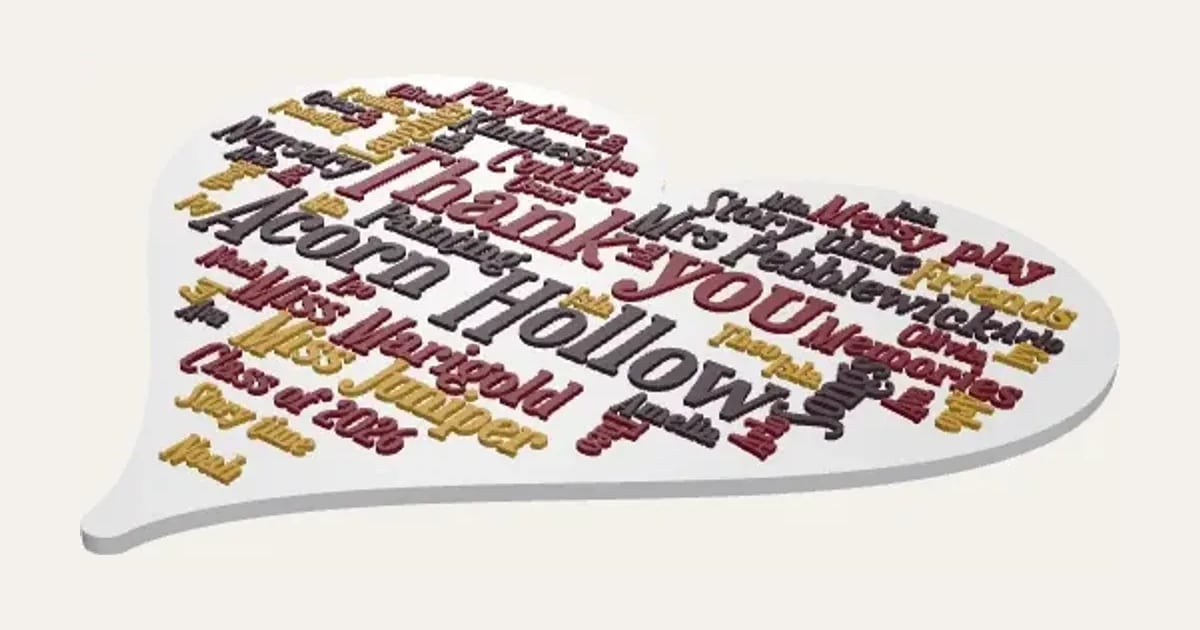
Words that mean something packed into a heart, circle, star or rectangle, the biggest in the middle and every word again smaller and smaller filling the gaps, with little hearts among them. Download it as a PDF to print and frame, in up to five colours, or 3D print it as a plaque with the words raised or inlaid flush, a filament for each colour. A thank-you for a nursery or teacher, a wedding or a birthday.
Customise it in your browser, then download a print-ready STL, or a multi-colour 3MF. No CAD skills needed.
About the Word Cloud
A word cloud of words that mean something, packed into a heart, circle, star or rectangle, the biggest in the middle and every word again, smaller and smaller, filling the gaps, with little hearts among them. Print it as a PDF in up to five colours, or 3D print it as a plaque with the words raised or inlaid flush.
What you can change
- Type your own biggest words, medium words and small words.
- Shape: heart, circle, rectangle and star, and 9 more.
- Font: 26 to choose from, from script to stencil.
- Direction: horizontal, mostly horizontal, horizontal and vertical and all vertical, and 5 more.
- Fill: normal, packed and extra packed.
- Words: raised on the plate and inlaid flush.
- All 6 colours are yours to pick.
- Adjust biggest words size, spacing between words, number of words and shuffle, and more.
- Turn on or off: biggest and medium words only once, mirror the shape, all capitals and little hearts among the words.
Size
About 18.8 × 17.1 × 0.4 cm (width × depth × height), one piece at the starting settings.
What you download
An STL for any slicer, and a 3MF with each colour as its own part, ready for an AMS or a filament change; or a PDF to print on paper or card and cut out.
Printing it
About 55 g of PLA and about 3 hours 10 minutes to print, one piece at the starting settings (15% infill, 2 walls, 0.2 mm layers, on a Bambu Lab A1). Your slicer gives the exact figures for your printer and settings.
On paper: print the PDF at 100% (actual size) on the page size you chose; it has every colour and the smallest words. On a 3D printer: it prints flat with no supports, and each word colour is its own part in the 3MF, so give each a filament (or AMS slot); raised words change filament only for the top millimetre.
Ideas for using it
- A thank-you for a nursery or teacher with the children’s names.
- A wedding gift with words from the vows or the day.
- A birthday present filled with things they love.
- A leaving gift for a colleague with words from the team.
Questions
What size is it?
About 18.8 × 17.1 × 0.4 cm (width × depth × height), one piece at the starting settings. Every size is a setting, so make it as big or small as you need.
Do I need a multi-colour printer?
No. Print it in one colour, or in colours with a filament change: the Colours line under the 3D view says at which height to change. With an AMS or another multi-colour printer, the 3MF prints it in one go.
Which printers and slicers does it work with?
Any FDM printer. The STL opens in every slicer; the 3MF keeps the colours as separate parts in Bambu Studio, Orca Slicer, PrusaSlicer and Cura. Pick your printer in the designer to check it fits the plate.
Can I sell what I make?
On Pro and Ultimate you can sell the prints you make, for example on Etsy or at craft fairs. On Free and Maker, print it for yourself or give it as a gift. The STL and 3MF files themselves are never for sharing or selling.
More Personalised
- Name Plate
- Name Keyring
- Stepped Name Keyring
- Street Sign
- Number Plate Keyring
- Name Desk Tidy
- Initial & Name
- Door Sign
- Christmas Ornaments
- Gift Tags
- Pet Tags
- Cake Topper
- Place Cards
- Halloween Decorations
- Table Numbers
- Name Puzzle
- Lithophane
- Bookmarks
- Name Fridge Magnets
- Trinket Dish
- Personalise Your Model
- Name Lantern
- Name Train
- Name Bunting
- Name Pencil Toppers
- Map Plaque
- Luggage Tag
- Pet Memorial Plaque
- Tooth Fairy Box
- Lithophane Lamp