Filamora Studios › Personalised
Place Cards
Wedding and party place cards with each guest's name raised on the card, and a slotted stand for each. Paste in the guest list.
Customise it in your browser, then download a print-ready STL, or a multi-colour 3MF. No CAD skills needed.
About the Place Cards
Wedding and party place cards with each guest’s name raised on the card, and a slotted stand for each. Paste in the guest list and the designer makes one each.
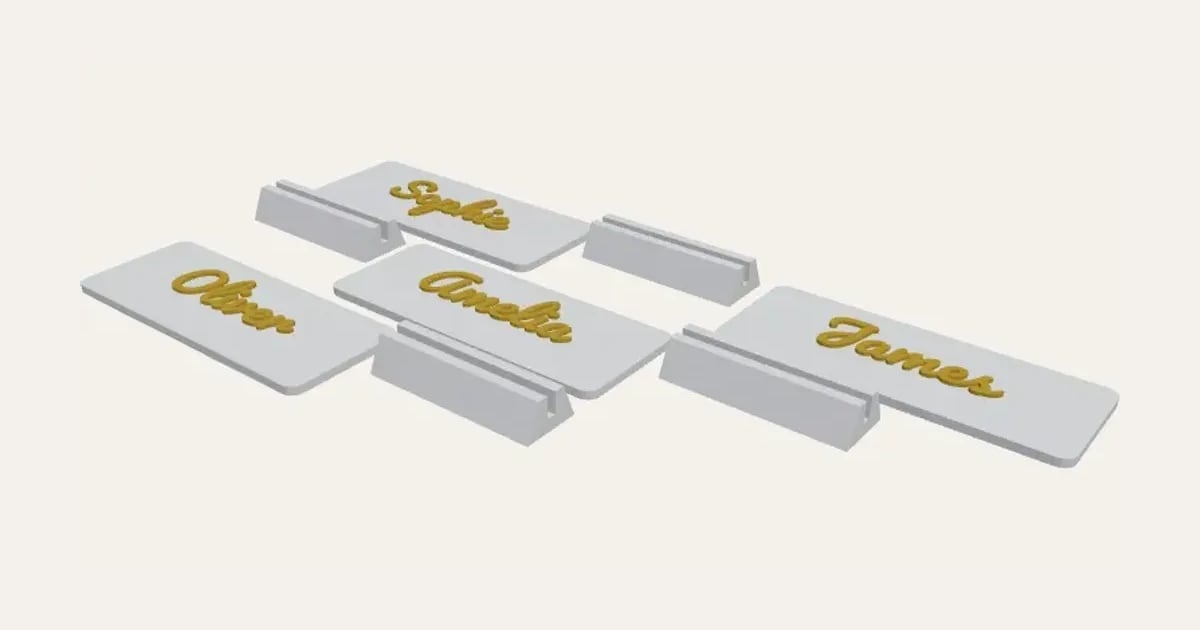
What you can change
- Type your own guest names and second line for guests without a table.
- Make one, or a whole batch at once: paste a list of names and get one each.
- Font: 26 to choose from, from script to stencil.
- Pick the card and name colours.
- Adjust card width, card height, corner radius and letter height, and more.
- Turn on or off: stand for each card.
Size
About 75 × 14 × 33 mm (width × depth × height), one piece at the starting settings.
What you download
An STL for any slicer, and a 3MF with each colour as its own part, ready for an AMS or a filament change; or a PDF to print on paper or card and cut out.
Printing it
About 8 g of PLA and about 35 minutes to print, one piece at the starting settings (15% infill, 2 walls, 0.2 mm layers, on a Bambu Lab A1). Your slicer gives the exact figures for your printer and settings.
On paper: print the PDF at 100% (actual size) on card, and cut along the fine grey lines.
Ideas for using it
- Wedding place settings that guests take home as a keepsake.
- Name cards for a Christmas dinner table.
- Place cards for a birthday meal or a christening lunch.
- Reserved seats at a conference or a work dinner.
No printer? Buy it printed in our shop
Questions
What size is it?
About 75 × 14 × 33 mm (width × depth × height), one piece at the starting settings. Every size is a setting, so make it as big or small as you need.
Do I need a multi-colour printer?
No. Print it in one colour, or in colours with a filament change: the Colours line under the 3D view says at which height to change. With an AMS or another multi-colour printer, the 3MF prints it in one go.
Which printers and slicers does it work with?
Any FDM printer. The STL opens in every slicer; the 3MF keeps the colours as separate parts in Bambu Studio, Orca Slicer, PrusaSlicer and Cura. Pick your printer in the designer to check it fits the plate.
No 3D printer? Can you print it for me?
Yes. Buy it printed from our shop, with your names and colours from the designer, made to order in our UK studio.
Can I sell what I make?
On Pro and Ultimate you can sell the prints you make, for example on Etsy or at craft fairs. On Free and Maker, print it for yourself or give it as a gift. The STL and 3MF files themselves are never for sharing or selling.
More Personalised
- Name Plate
- Name Keyring
- Stepped Name Keyring
- Street Sign
- Number Plate Keyring
- Name Desk Tidy
- Initial & Name
- Door Sign
- Christmas Ornaments
- Gift Tags
- Pet Tags
- Cake Topper
- Halloween Decorations
- Table Numbers
- Name Puzzle
- Lithophane
- Bookmarks
- Name Fridge Magnets
- Trinket Dish
- Personalise Your Model
- Name Lantern
- Name Train
- Name Bunting
- Name Pencil Toppers
- Word Cloud
- Map Plaque
- Luggage Tag
- Pet Memorial Plaque
- Tooth Fairy Box
- Lithophane Lamp