Filamora Studios › Personalised
Table Numbers
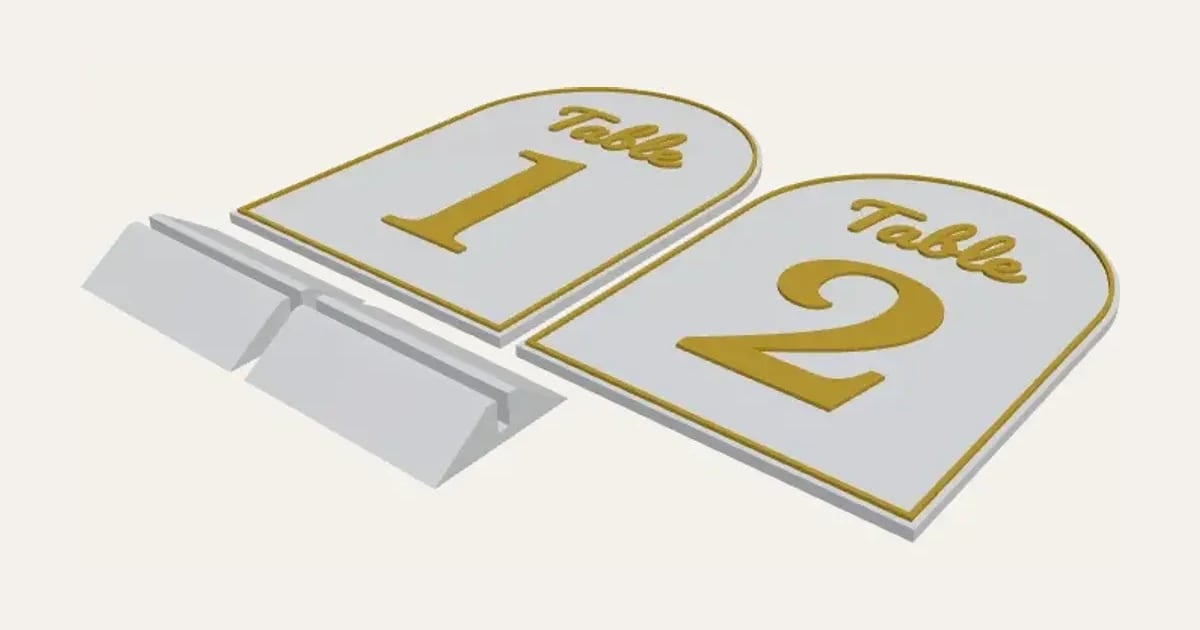
Wedding and event table numbers: a word over a big number on an arched, square or round card, with a sturdy stand. Type 1-12 for a set.
Customise it in your browser, then download a print-ready STL, or a multi-colour 3MF. No CAD skills needed.
About the Table Numbers
Wedding and event table numbers: a word over a big number on an arched, square or round card, with a sturdy stand. Type 1-12 to make a whole set at once.
What you can change
- Type your own numbers and word above the number.
- Word font: 26 to choose from, from script to stencil.
- Number font: 26 to choose from, from script to stencil.
- Shape: arched top, rectangle and round.
- Pick the card and lettering colours.
- Adjust card width, card height, card thickness and raised lettering thickness.
- Turn on or off: raised rim round the edge and stand for each card.
Size
About 10 × 14 × 0.4 cm (width × depth × height), one piece at the starting settings.
What you download
An STL for any slicer, and a 3MF with each colour as its own part, ready for an AMS or a filament change.
Printing it
About 84 g of PLA and about 4 hours 50 minutes to print, one piece at the starting settings (15% infill, 2 walls, 0.2 mm layers, on a Bambu Lab A1). Your slicer gives the exact figures for your printer and settings.
Ideas for using it
- Table numbers for a wedding reception, in your colours.
- Numbered tables for a charity dinner or a quiz night.
- Numbers for a café or a pub garden.
- Reuse them for parties and anniversaries.
Questions
What size is it?
About 10 × 14 × 0.4 cm (width × depth × height), one piece at the starting settings. Every size is a setting, so make it as big or small as you need.
Do I need a multi-colour printer?
No. Print it in one colour, or in colours with a filament change: the Colours line under the 3D view says at which height to change. With an AMS or another multi-colour printer, the 3MF prints it in one go.
Which printers and slicers does it work with?
Any FDM printer. The STL opens in every slicer; the 3MF keeps the colours as separate parts in Bambu Studio, Orca Slicer, PrusaSlicer and Cura. Pick your printer in the designer to check it fits the plate.
Can I sell what I make?
On Pro and Ultimate you can sell the prints you make, for example on Etsy or at craft fairs. On Free and Maker, print it for yourself or give it as a gift. The STL and 3MF files themselves are never for sharing or selling.
More Personalised
- Name Plate
- Name Keyring
- Stepped Name Keyring
- Street Sign
- Number Plate Keyring
- Name Desk Tidy
- Initial & Name
- Door Sign
- Christmas Ornaments
- Gift Tags
- Pet Tags
- Cake Topper
- Place Cards
- Halloween Decorations
- Name Puzzle
- Lithophane
- Bookmarks
- Name Fridge Magnets
- Trinket Dish
- Personalise Your Model
- Name Lantern
- Name Train
- Name Bunting
- Name Pencil Toppers
- Word Cloud
- Map Plaque
- Luggage Tag
- Pet Memorial Plaque
- Tooth Fairy Box
- Lithophane Lamp