Filamora Studios › Personalised
Mini A-Frame Sign
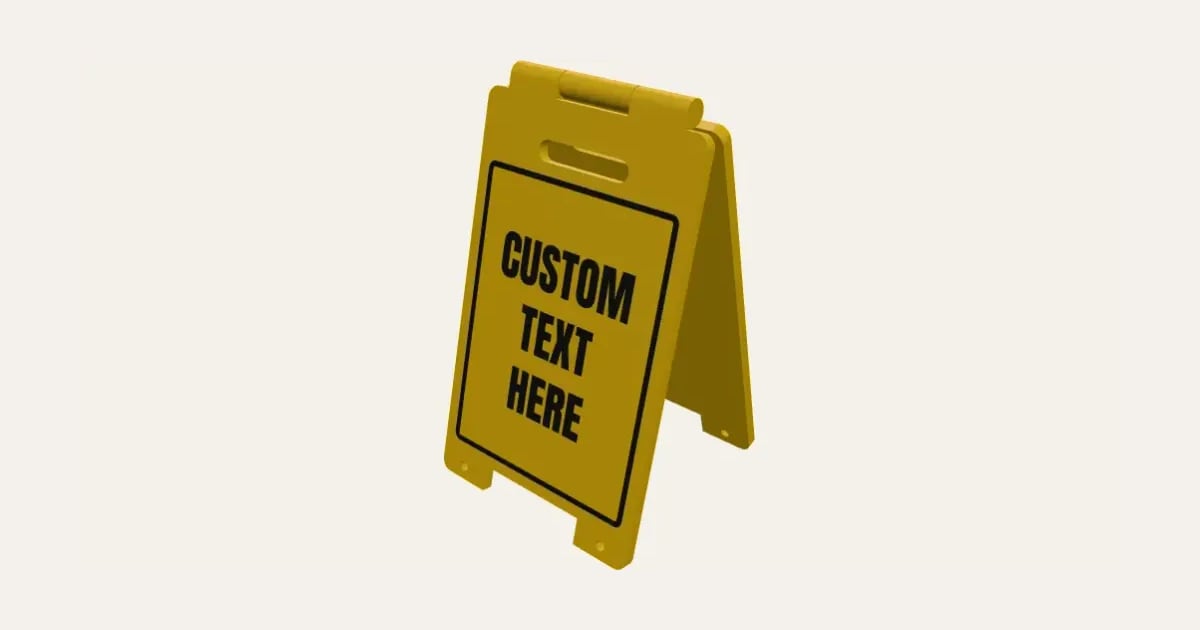
A little sandwich-board sign like a wet floor board, with your words on the front and back, a handle slot, legs and a border, inlaid flush in a second colour. The two panels print flat, already joined by a print-in-place hinge, and fold up to stand or flat to store. For desks, shop counters, model layouts and jokes.
Customise it in your browser, then download a print-ready STL, or a multi-colour 3MF. No CAD skills needed.
About the Mini A-Frame Sign
A mini sandwich-board sign, like a wet floor board: two panels with your words, a handle slot, legs and a border, joined at the top by a hinge. It prints flat, opened out, with the hinge already assembled and the words inlaid flush in a second colour, then folds up to stand, and flat to put away. Put the same words on both sides, different ones, or leave the back blank.
What you can change
- Type your own words.
- Make one, or a whole batch at once: paste a list of names and get one each.
- Back panel: the same words, its own words and blank.
- Warning symbol above the words: none, triangle with ! and solid triangle, ! cut out.
- Font: 29 to choose from, from script to stencil.
- Size: small, medium, large and my own size.
- Words printed: face down, inlaid flush and face up, raised.
- Pick the board and letters and border colours.
- Adjust letter height, width, height and panel thickness, and more.
- Turn on or off: border.
What you download
An STL for any slicer, and a 3MF with each colour as its own part, ready for an AMS or a filament change.
Printing it
Prints flat, opened out, with the hinge already assembled: no supports. Words face down (the default): the letters and border are the first layers, in a second colour (use the AMS, or change filament where the board colour starts), so the side on the plate is the front, and a textured plate gives it a lovely finish. Fold the panels up to stand; it also folds flat to put away. Words face up: the letters stand on top in the second colour, and the panels fold down, stopping at a narrow A. Either way, once it's off the plate, work the hinge open and shut a few times to free it. To stop it splaying on a smooth surface, tie a cord between the holes in the legs, about half the sign's height long.
Ideas for using it
- “Caution: genius at work” for a desk.
- Open on one side and closed on the other, for a stall or counter.
- A little sign for a model railway or village.
- Party signs: “Bar this way”, “Mind the step”.
Questions
How does the hinge print?
Already joined: the front panel’s two outer knuckles have cone pins inside the back panel’s middle knuckle, with a gap all round. Work it open and shut a few times when it comes off the plate to free it.
The hinge is stuck or loose
Raise the hinge clearance if it’s fused, or lower it if it flops. 0.35 mm suits most printers.
Why are the words on the underside?
By default the panels fold up, so the side that was on the plate ends up on the outside. Printing the words there, inlaid flush as the first layers, gives a crisp, flat front (a textured plate looks great). If you’d rather have raised letters, set Words printed to Face up: then the panels fold down, and stop at a narrow A.
It slides open on my desk
Tie a cord between the holes in the legs of the two panels, about half the sign’s height long, like the chain on a real A-board.
How do I get more lines?
Put a / where each line should break: “CAUTION/WET/FLOOR” is three lines. The letters shrink to fit.
Do I need a multi-colour printer?
No. Print it in one colour, or in colours with a filament change: the Colours line under the 3D view says at which height to change. With an AMS or another multi-colour printer, the 3MF prints it in one go.
Which printers and slicers does it work with?
Any FDM printer. The STL opens in every slicer; the 3MF keeps the colours as separate parts in Bambu Studio, Orca Slicer, PrusaSlicer and Cura. Pick your printer in the designer to check it fits the plate.
Can I sell what I make?
On Pro and Ultimate you can sell the prints you make, for example on Etsy or at craft fairs, for as long as your membership is active: if it ends, stop selling them. On Free and Maker, print it for yourself or give it as a gift. The STL and 3MF files themselves are never for sharing or selling.
More Personalised
- Name Plate
- Name Keyring
- Stepped Name Keyring
- Street Sign
- Number Plate Keyring
- Name Desk Tidy
- Initial & Name
- Door Sign
- Christmas Ornaments
- Gift Tags
- Pet Tags
- Cake Topper
- Place Cards
- Halloween Decorations
- Table Numbers
- Name Puzzle
- Lithophane
- Bookmarks
- Gym Weight Plate Keyring
- Name Fridge Magnets
- Trinket Dish
- Personalise Your Model
- Name Lantern
- Name Train
- Name Bunting
- Name Pencil Toppers
- Word Cloud
- Map Plaque
- Luggage Tag
- Pet Memorial Plaque
- Tooth Fairy Box
- Lithophane Lamp
- Lanyard Name Badge
- Paracord Letter Beads
- Dog Treat Pot
- Tumbler Lip Balm Holder
- Cable Winder Keyring
- Coin Bottle Opener Keyring
- Pet Food Scoop
- Golf Divot Tool and Ball Marker
- Drink Stirrers and Cocktail Picks
- Earbuds Case