Filamora Studios › Personalised
Laser-Cut Name Sign
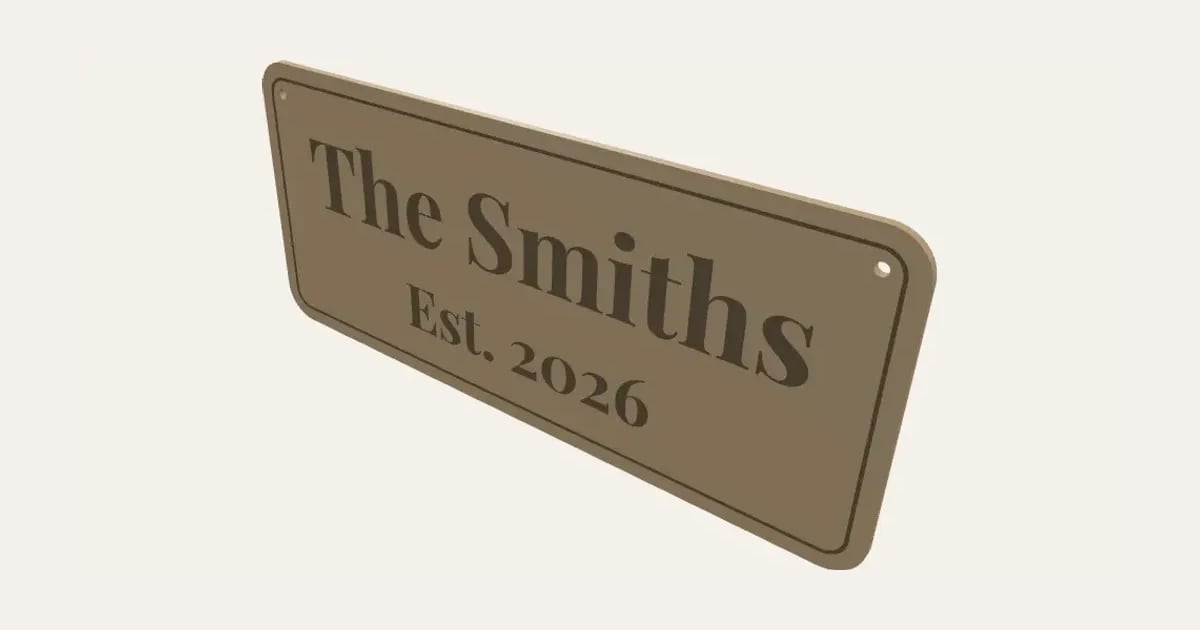
A name sign to laser cut from wood or acrylic: words engraved on a rounded, oval, arched or plaque board, a two-tone layered sign with the letters cut to glue on, or a word cut-out where the words are the sign. A second line, a frame and hanging holes, as an SVG for LightBurn, xTool or Glowforge. Not yet tested on a laser.
Customise it in your browser, then download a print-ready PDF to print at home. No design skills needed.
About the Laser-Cut Name Sign
A name sign to cut on a laser, three ways: words engraved on a board (rectangle, rounded, oval, arch or plaque, with an engraved frame), a layered sign with the letters cut out separately to glue on in another wood or colour, or a word cut-out where the words themselves are the sign. Add a second, smaller line, and holes to hang it on a cord or screw it up. It comes as an SVG for LightBurn, xTool Creative Space, Glowforge and other laser software, laid out on your sheet. Please note: we don’t have a laser cutter yet, so this hasn’t been tried on a real machine.
What you can change
- Type your own words and second line.
- Style: engraved board, layered and word cut-out.
- Font: 30 to choose from, from script to stencil.
- Board shape: rectangle, rounded rectangle, oval, arch and plaque.
- Holes: none, two at the top, one at the top and four corners.
- Sheet size: 300 × 300 mm, 400 × 300 mm, 20 × 12 in, 600 × 400 mm and my own size.
- Pick the material colour.
- Adjust letter height, width, height and hole size, and more.
- Turn on or off: engraved frame.
What you download
.
Printing it
Untested: we don’t have a laser cutter yet, so this hasn’t been cut on a real machine. Cut a small one first. In the SVG, red hairlines are to cut and black fills to engrave; set those in your laser software (engrave before you cut, so the piece doesn’t move). Layered: cut the letters from a second sheet, and glue them on with wood glue.
Ideas for using it
- A family name sign for the hall, with the year you moved in.
- A script “Home” or “Love” word cut-out for a shelf or wall.
- A two-tone door number in walnut on birch.
- A child’s bedroom door sign.
- Shop, stall or wedding signs.
Questions
Has this been tested?
Not on a laser yet: we don’t have one. The shapes are checked on screen, but please cut a small one first, and tell us how it comes out.
Which lines cut and which engrave?
In the SVG, red hairlines are cut lines and black filled shapes are engraving. Engrave first, then cut, so the piece stays put while it’s engraved.
How does the layered style work?
The board and the letters are separate pieces. Cut the letters from a second sheet (a darker wood, or coloured acrylic) and glue them onto the board with wood glue or a thin layer of CA glue.
Why is there a bar under the word cut-out?
Letters that don’t touch each other would fall apart when cut out. The bar joins them along their feet. Joined-up script fonts like Pacifico hold together on their own, so you can turn it off for those.
What does kerf do here?
The cut lines are moved out by half your laser’s kerf, so the sign comes out the size you set. For a sign it barely matters; the default is fine.
Can I sell what I make?
On Pro and Ultimate you can sell the prints you make, for example on Etsy or at craft fairs, for as long as your membership is active: if it ends, stop selling them. On Free and Maker, print it for yourself or give it as a gift. The PDF itself is never for sharing or selling.
More Personalised
- Name Plate
- Name Keyring
- Stepped Name Keyring
- Street Sign
- Number Plate Keyring
- Name Desk Tidy
- Initial & Name
- Door Sign
- Christmas Ornaments
- Gift Tags
- Pet Tags
- Cake Topper
- Place Cards
- Halloween Decorations
- Table Numbers
- Name Puzzle
- Lithophane
- Bookmarks
- Gym Weight Plate Keyring
- Mini A-Frame Sign
- Miniature Street Name Signs
- Name Fridge Magnets
- Trinket Dish
- Personalise Your Model
- Name Lantern
- Name Train
- Name Bunting
- Name Pencil Toppers
- Word Cloud
- Map Plaque
- Name Bracelet
- Luggage Tag
- Pet Memorial Plaque
- Tooth Fairy Box
- Lithophane Lamp
- Lanyard Name Badge
- Paracord Letter Beads
- Dog Treat Pot
- Tumbler Lip Balm Holder
- Cable Winder Keyring
- Coin Bottle Opener Keyring
- Pet Food Scoop
- Golf Divot Tool and Ball Marker
- Drink Stirrers and Cocktail Picks
- Earbuds Case