Filamora Studios › Personalised
Tumbler Lip Balm Holder
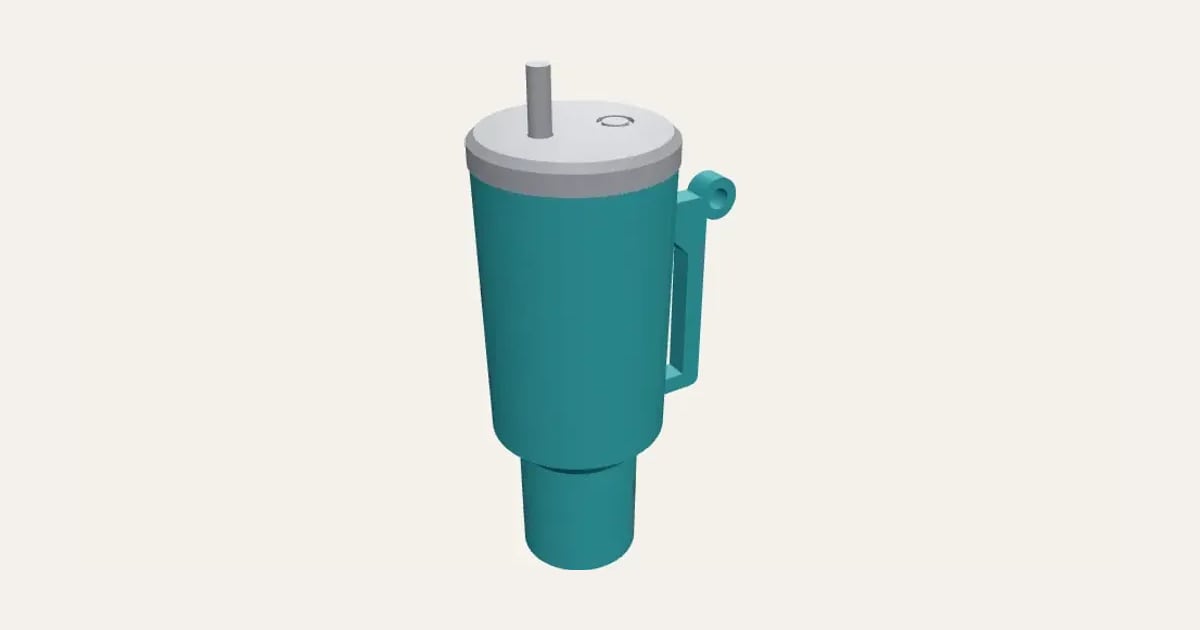
A stick of lip balm in a mini travel tumbler: a stepped cup with a D handle and keyring loop, and a lid with a band and straw. Push the balm up through the base to get it out.
Customise it in your browser, then download a print-ready STL, or a multi-colour 3MF. No CAD skills needed.
About the Tumbler Lip Balm Holder
A lip balm holder shaped like a big travel tumbler: a narrow foot stepping out to a wider cup, a D handle with a keyring loop, and a lid with a band and a straw that plugs into its top. A stick of lip balm stands inside; push it up through the hole in the base to get it out. Add an initial on the front.
What you can change
- Type your own initial or short name on the front.
- Make one, or a whole batch at once: paste a list of names and get one each.
- Font: 26 to choose from, from script to stencil.
- Pick the tumbler and lid and straw colours.
- Adjust lip balm stick, across and lip balm stick, long.
- Turn on or off: A keyring loop on the handle.
What you download
An STL for any slicer, and a 3MF with each colour as its own part, ready for an AMS or a filament change.
Printing it
Everything prints without supports: the tumbler the right way up, the lid upside down, the straw standing up. Push the straw into its hole in the lid, drop a stick of lip balm in, plug the lid on, and push the balm up through the hole in the base to take it out. Measure your lip balm: most sticks are about 15.5–16 mm across and 67 mm long.
Questions
Will my lip balm fit?
Measure it: most sticks are about 15.5–16 mm across and 67 mm long, and both are settings.
Can it go on my keys?
Yes: the little loop on the handle takes a split ring or a bag clip.
Do I need a multi-colour printer?
No. Print it in one colour, or in colours with a filament change: the Colours line under the 3D view says at which height to change. With an AMS or another multi-colour printer, the 3MF prints it in one go.
Which printers and slicers does it work with?
Any FDM printer. The STL opens in every slicer; the 3MF keeps the colours as separate parts in Bambu Studio, Orca Slicer, PrusaSlicer and Cura. Pick your printer in the designer to check it fits the plate.
Can I sell what I make?
On Pro and Ultimate you can sell the prints you make, for example on Etsy or at craft fairs. On Free and Maker, print it for yourself or give it as a gift. The STL and 3MF files themselves are never for sharing or selling.
More Personalised
- Name Plate
- Name Keyring
- Stepped Name Keyring
- Street Sign
- Number Plate Keyring
- Name Desk Tidy
- Initial & Name
- Door Sign
- Christmas Ornaments
- Gift Tags
- Pet Tags
- Cake Topper
- Place Cards
- Halloween Decorations
- Table Numbers
- Name Puzzle
- Lithophane
- Bookmarks
- Name Fridge Magnets
- Trinket Dish
- Personalise Your Model
- Name Lantern
- Name Train
- Name Bunting
- Name Pencil Toppers
- Word Cloud
- Map Plaque
- Luggage Tag
- Pet Memorial Plaque
- Tooth Fairy Box
- Lithophane Lamp
- Lanyard Name Badge
- Paracord Letter Beads
- Dog Treat Pot
- Cable Winder Keyring
- Coin Bottle Opener Keyring
- Pet Food Scoop
- Golf Divot Tool and Ball Marker
- Drink Stirrers and Cocktail Picks
- Earbuds Case