Laser-Cut Name Bauble
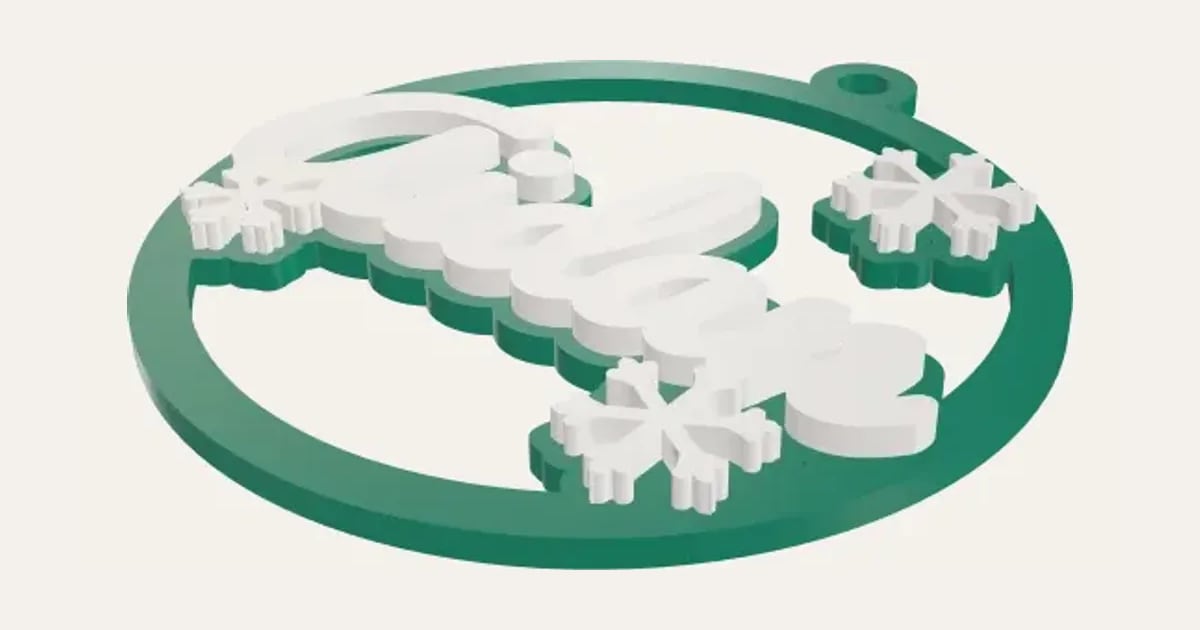
A bauble with the name across it and snowflakes round the edge, the name and snowflakes cut again in white to glue on top.
Customise it in your browser, then download a print-ready PDF to print at home. No design skills needed.
About the Laser-Cut Name Bauble
A laser-cut name bauble: a ring with the name across it and snowflakes round the edge, all in one piece with a loop to hang it, and the name and snowflakes cut again in white to glue on top.
What you can change
- Type your own name.
- Font: 35 to choose from, from script to stencil.
- Sheet size: 300 × 300 mm, 400 × 300 mm, 20 × 12 in, 600 × 400 mm and my own size.
- Pick the bauble and name and snowflakes colours.
- Adjust across, sheet thickness and kerf.
- Turn on or off: snowflakes.
What you download
.
Printing it
Untested: we don’t have a laser cutter yet, so this hasn’t been cut on a real machine. Cut one first. Cut the bauble from 3 mm coloured acrylic or ply, and the name and snowflakes again from white or mirror acrylic; glue them on top, lined up with the ones cut into the bauble. Hang it from the loop with ribbon. In the SVG, red hairlines are to cut and black fills to engrave.
Read: 12 personalised Christmas decorations you can 3D print this year
Questions
What do I cut it from?
The bauble from 3 mm coloured acrylic or ply, the name and snowflakes from white or mirror acrylic.
Can I leave the snowflakes off?
Yes: untick Snowflakes for just the name.
Can I sell what I make?
On Pro and Ultimate you can sell the prints you make, for example on Etsy or at craft fairs, for as long as your membership is active: if it ends, stop selling them. On Free and Maker, print it for yourself or give it as a gift. The PDF itself is never for sharing or selling.
More Christmas
- Snowflake Name
- Magic Santa Key
- Advent Numbers
- Tree Topper Star
- Line Art Ornaments
- Ribbed Christmas Trees
- Ribbed Finial Bauble
- Christmas Napkin Holder
- Christmas Napkin Rings
- Christmas Tree Snack Tray
- Advent Calendar Drawers
- Christmas Shaped Box
- Photo Bauble
- Christmas Clicker
- Stocking Holder
- Gift Card Tree
- Christmas Village House
- Santa Treat Plate
- Christmas Card Display
- Elf Props
- Christmas Stockings Print
- Christmas Cracker Toys
- Bauble Name Tags
- Reindeer Food Pot
- Sleeps Till Christmas Countdown
- Bottle Neck Tag
- Gift Card Present Box
- Gift Card Sleeve
- Name Bauble
- Laser-Cut Shadow Box
- Gingerbread Man Ornament
- Chocolate Holder Ornament
- Slot-Together Christmas Tree
- Family Signpost Ornament
- Laser-Cut Shaped Gift Box
- Christmas Light-Up Lantern
- Light-Up Christmas Bauble
- Reindeer & Ears Headband