Christmas Light-Up Lantern
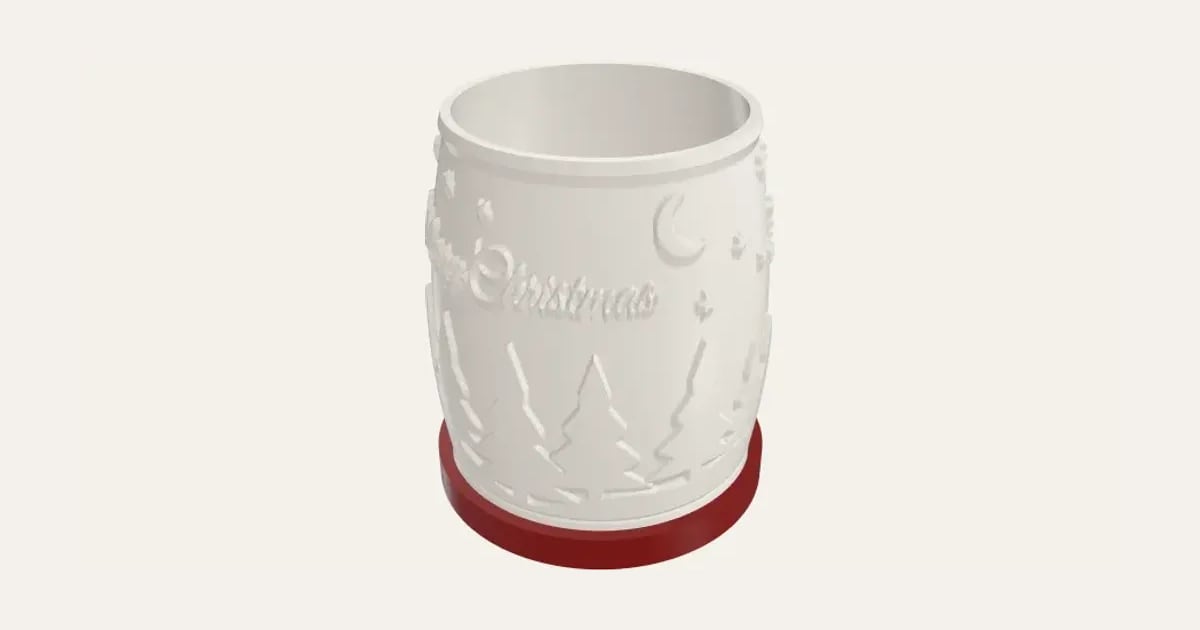
A glowing Christmas lantern or bell: a snowy forest at night, snowflakes or stars all the way round, with Merry Christmas, a family name or a message on the front, made as a lithophane so the picture shows when the LED light inside is on. Prints standing up with no supports, on a base for an LED puck light.
Customise it in your browser, then download a print-ready STL, or a multi-colour 3MF. No CAD skills needed.
About the Christmas Light-Up Lantern
A Christmas lantern that glows: a rounded lantern or a bell with a picture all the way round (a snowy forest at night, snowflakes or stars) and your words on the front: Merry Christmas, a family name or a year. It’s made like a lithophane, so when the LED light inside is on, the picture shows dark against a warm glow, or glowing on a darker wall.
What you can change
- Type your own words on the front and A second line, smaller.
- Shape: lantern and bell.
- Picture: snowy forest at night, snowflakes and stars.
- A figure on the front: none, stag, leaping reindeer and doe and fawn, and 25 more.
- Font: 35 to choose from, from script to stencil.
- Lit up: the picture dark on a bright glow and the picture glowing on a darker wall.
- Detail: draft, normal and fine.
- Light: USB LED puck light, battery LED puck light and LED tealight.
- Pick the lantern and base colours.
- Adjust shuffle the picture, size of the words, space between the letters and diameter, and more.
- Turn on or off: A base with a hollow for an LED light.
Size
About 9.6 × 9.6 × 11 cm (width × depth × height), one piece at the starting settings.
What you download
An STL for any slicer, and a 3MF with each colour as its own part, ready for an AMS or a filament change.
Printing it
About 88 g of PLA and about 5 hours to print, one piece at the starting settings (15% infill, 2 walls, 0.2 mm layers, on a Bambu Lab A1). Your slicer gives the exact figures for your printer and settings.
No supports: it prints standing up, in white or natural PLA at 100% infill (a lithophane needs it solid to glow evenly); the base prints flat. Light it with a USB LED puck light (about 60 mm across) in the base, its cable pressed up into the slot under it, or an LED tea light for a softer glow. Use only an LED light inside, never a real candle.
Read: 12 personalised Christmas decorations you can 3D print this year
Questions
Does it need supports?
No: it prints standing up, and every edge of the picture slopes, so nothing overhangs. The bell’s roof closes at 45°, with a hanging loop on top. The base prints flat.
Which light should I use?
A USB LED puck light about 60 mm across gives the brightest glow: it sits in the base, and its cable presses up into a slot under it from below. An LED tea light gives a softer glow. Never a real candle.
Can I put our name on it?
Yes: words on the front (Merry Christmas, a name or a message) and a smaller second line under them, such as a year. Pick any font; a script like Great Vibes looks lovely lit.
How should I print it?
In white or natural PLA at 100% infill, so it glows evenly. 0.2 mm layers work; 0.12 mm shows the picture more finely.
Can I change the picture?
Choose a snowy forest, snowflakes or stars, and shuffle it until you like where everything falls. More pictures are on the way.
What size is it?
About 9.6 × 9.6 × 11 cm (width × depth × height), one piece at the starting settings. Every size is a setting, so make it as big or small as you need.
Do I need a multi-colour printer?
No. Print it in one colour, or in colours with a filament change: the Colours line under the 3D view says at which height to change. With an AMS or another multi-colour printer, the 3MF prints it in one go.
Which printers and slicers does it work with?
Any FDM printer. The STL opens in every slicer; the 3MF keeps the colours as separate parts in Bambu Studio, Orca Slicer, PrusaSlicer and Cura. Pick your printer in the designer to check it fits the plate.
My 3MF opens all grey in Bambu Studio. What do I do?
Download the 3MF again: files made before 3 November 2026 open in one colour in Bambu Studio 2.9 and later. A new one brings its colours, and Bambu Studio asks you to match each to one of your filaments. With an older file, File → Import → Import 3D Models (Ctrl+I) often keeps the colours, or select each part and press 1, 2, 3… to put it on that filament.
Can I sell what I make?
On Pro and Ultimate you can sell the prints you make, for example on Etsy or at craft fairs, for as long as your membership is active: if it ends, stop selling them. On Free and Maker, print it for yourself or give it as a gift. The STL and 3MF files themselves are never for sharing or selling.
More Christmas
- Snowflake Name
- Magic Santa Key
- Advent Numbers
- Tree Topper Star
- Line Art Ornaments
- Ribbed Christmas Trees
- Ribbed Finial Bauble
- Christmas Napkin Holder
- Christmas Napkin Rings
- Christmas Tree Snack Tray
- Advent Calendar Drawers
- Christmas Shaped Box
- Photo Bauble
- Christmas Clicker
- Stocking Holder
- Gift Card Tree
- Christmas Village House
- Santa Treat Plate
- Christmas Card Display
- Elf Props
- Christmas Stockings Print
- Christmas Cracker Toys
- Bauble Name Tags
- Reindeer Food Pot
- Sleeps Till Christmas Countdown
- Bottle Neck Tag
- Gift Card Present Box
- Gift Card Sleeve
- Name Bauble
- Laser-Cut Name Bauble
- Laser-Cut Shadow Box
- Gingerbread Man Ornament
- Chocolate Holder Ornament
- Slot-Together Christmas Tree
- Family Signpost Ornament
- Laser-Cut Shaped Gift Box
- Light-Up Christmas Bauble
- Reindeer & Ears Headband