Family Signpost Ornament
A layered Christmas ornament to laser cut: a signpost with an arrow for each name, a snowy hill with the family name and year, a tree, snowman, gingerbread man or present beside it, and stars cut out of a dark sky. Up to six names. Laid out as an SVG for LightBurn, xTool or Glowforge. Not yet tested on a laser.
Customise it in your browser, then download a print-ready PDF to print at home. No design skills needed.
About the Family Signpost Ornament
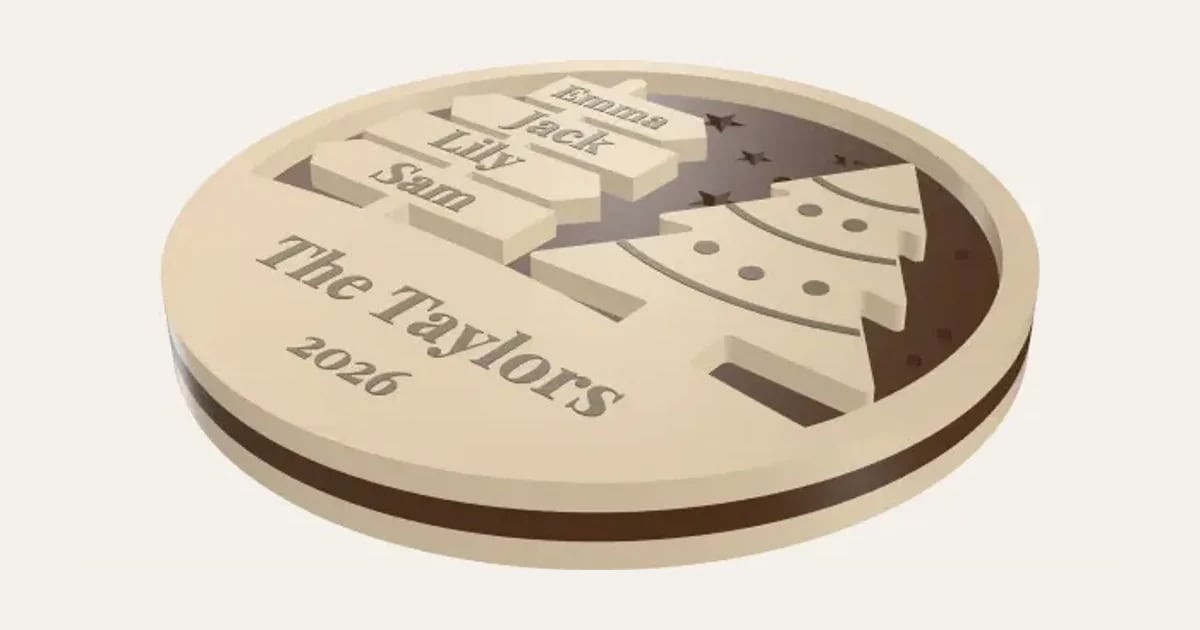
A family Christmas ornament, laser cut in three layers: a signpost with an arrow for each of you, up to six names, pointing this way and that, standing on a snowy hill engraved with your family name and the year, with a Christmas tree, a snowman, a gingerbread man or a present beside it. The sky is cut from a dark sheet with stars and snow cut out of it, so the light back shows through them. Laid out on your sheet as an SVG for LightBurn, xTool Creative Space, Glowforge and other laser software. Please note: we don’t have a laser cutter yet, so this hasn’t been tried on a real machine.
What you can change
- Type your own family name, year and names on the signpost.
- Font: 35 to choose from, from script to stencil.
- Beside the signpost: A Christmas tree, A snowman, A gingerbread man and A present.
- Signpost on the: left and right.
- Sheet size: 300 × 300 mm, 400 × 300 mm, 20 × 12 in, 600 × 400 mm and my own size.
- Pick the front, sky and back colours.
- Adjust stars in the sky, across, sheet thickness and kerf.
What you download
.
Printing it
Untested: we don’t have a laser cutter yet, so this hasn’t been cut on a real machine. Cut one first. Cut the back and front from light 3 mm plywood (birch or basswood) and the sky from a dark one (walnut). Glue the sky on the back, lined up, then the front on top. Hang it from the loop with ribbon or twine. In the SVG, red hairlines are to cut and black fills to engrave.
Ideas for using it
- A new ornament for the family tree each year, with the year on it.
- One for the grandparents, with every grandchild on the signpost.
- A first Christmas in a new home, or with a new baby on the signpost.
- Made to order at a Christmas market, with each family’s names.
Read: 12 personalised Christmas decorations you can 3D print this year
Questions
How many names fit?
Up to six. Each arrow is as long as its name needs, and the names get smaller as you add more; it tells you if one comes out too small to read, so try a bigger ornament or a shorter name.
What do I cut it from?
The back and front from a light 3 mm plywood (birch or basswood) and the sky from a dark one (walnut ply). The stars and snow are cut out of the sky, so the light back shows through them. The names and family name are engraved.
How do I put it together?
Glue the sky on the back, lined up round the edge, then the front on top, and leave it under something flat to dry. Thread ribbon or twine through the loop at the top.
Can I sell ornaments I make with it?
Yes, on Pro and Ultimate: make them with your customers’ names and sell the finished ornaments.
Can I sell what I make?
On Pro and Ultimate you can sell the prints you make, for example on Etsy or at craft fairs, for as long as your membership is active: if it ends, stop selling them. On Free and Maker, print it for yourself or give it as a gift. The PDF itself is never for sharing or selling.
More Christmas
- Snowflake Name
- Magic Santa Key
- Advent Numbers
- Tree Topper Star
- Line Art Ornaments
- Ribbed Christmas Trees
- Ribbed Finial Bauble
- Christmas Napkin Holder
- Christmas Napkin Rings
- Christmas Tree Snack Tray
- Advent Calendar Drawers
- Christmas Shaped Box
- Photo Bauble
- Christmas Clicker
- Stocking Holder
- Gift Card Tree
- Christmas Village House
- Santa Treat Plate
- Christmas Card Display
- Elf Props
- Christmas Stockings Print
- Christmas Cracker Toys
- Bauble Name Tags
- Reindeer Food Pot
- Sleeps Till Christmas Countdown
- Bottle Neck Tag
- Gift Card Present Box
- Gift Card Sleeve
- Name Bauble
- Laser-Cut Name Bauble
- Laser-Cut Shadow Box
- Gingerbread Man Ornament
- Chocolate Holder Ornament
- Slot-Together Christmas Tree
- Laser-Cut Shaped Gift Box
- Christmas Light-Up Lantern
- Light-Up Christmas Bauble
- Reindeer & Ears Headband