Christmas Card Display
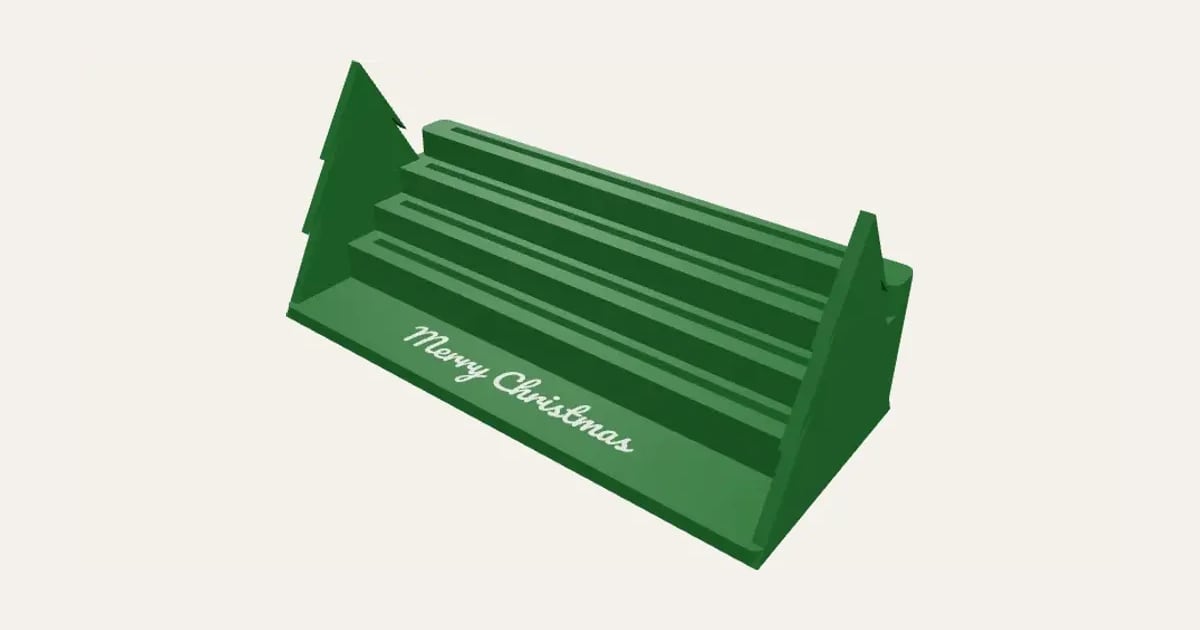
Stepped rows of slots that hold your Christmas cards up, each row higher than the one in front, with a tree at each end and words along the front. Sized to your widest card.
Customise it in your browser, then download a print-ready STL, or a multi-colour 3MF. No CAD skills needed.
About the Christmas Card Display
A Christmas card display: stepped rows of slots that hold your cards up, each row higher than the one in front, with a tree at each end and words along the front. Sized to your widest card, so nothing topples off the mantelpiece.
What you can change
- Type your own along the front.
- Font: 26 to choose from, from script to stencil.
- Pick the stand and words colours.
- Adjust rows of cards, widest card, slot width and each row higher by.
- Turn on or off: christmas trees at the ends.
Size
About 14.8 × 6.5 × 6.5 cm (width × depth × height), one piece at the starting settings.
What you download
An STL for any slicer, and a 3MF with each colour as its own part, ready for an AMS or a filament change.
Printing it
About 79 g of PLA and about 4 hours 30 minutes to print, one piece at the starting settings (15% infill, 2 walls, 0.2 mm layers, on a Bambu Lab A1). Your slicer gives the exact figures for your printer and settings.
Prints as it stands, with no supports; the trees' tiers slope at 45° underneath. The words are inlaid in the top layers of the front ledge, so swap filament (or let the AMS) for just those.
Read: 12 personalised Christmas decorations you can 3D print this year
Questions
How many cards does it hold?
A row of cards in each step: choose how many rows, and the width to suit your biggest card.
What size is it?
About 14.8 × 6.5 × 6.5 cm (width × depth × height), one piece at the starting settings. Every size is a setting, so make it as big or small as you need.
Do I need a multi-colour printer?
No. Print it in one colour, or in colours with a filament change: the Colours line under the 3D view says at which height to change. With an AMS or another multi-colour printer, the 3MF prints it in one go.
Which printers and slicers does it work with?
Any FDM printer. The STL opens in every slicer; the 3MF keeps the colours as separate parts in Bambu Studio, Orca Slicer, PrusaSlicer and Cura. Pick your printer in the designer to check it fits the plate.
Can I sell what I make?
On Pro and Ultimate you can sell the prints you make, for example on Etsy or at craft fairs. On Free and Maker, print it for yourself or give it as a gift. The STL and 3MF files themselves are never for sharing or selling.
More Christmas
- Snowflake Name
- Magic Santa Key
- Advent Numbers
- Tree Topper Star
- Line Art Ornaments
- Ribbed Christmas Trees
- Ribbed Finial Bauble
- Christmas Napkin Holder
- Christmas Napkin Rings
- Christmas Tree Snack Tray
- Advent Calendar Drawers
- Christmas Shaped Box
- Photo Bauble
- Christmas Clicker
- Stocking Holder
- Gift Card Tree
- Christmas Village House
- Santa Treat Plate
- Elf Props
- Christmas Stockings Print
- Christmas Cracker Toys