Filamora Studios › Storage & organising
MTG Stackable Modular Storage System
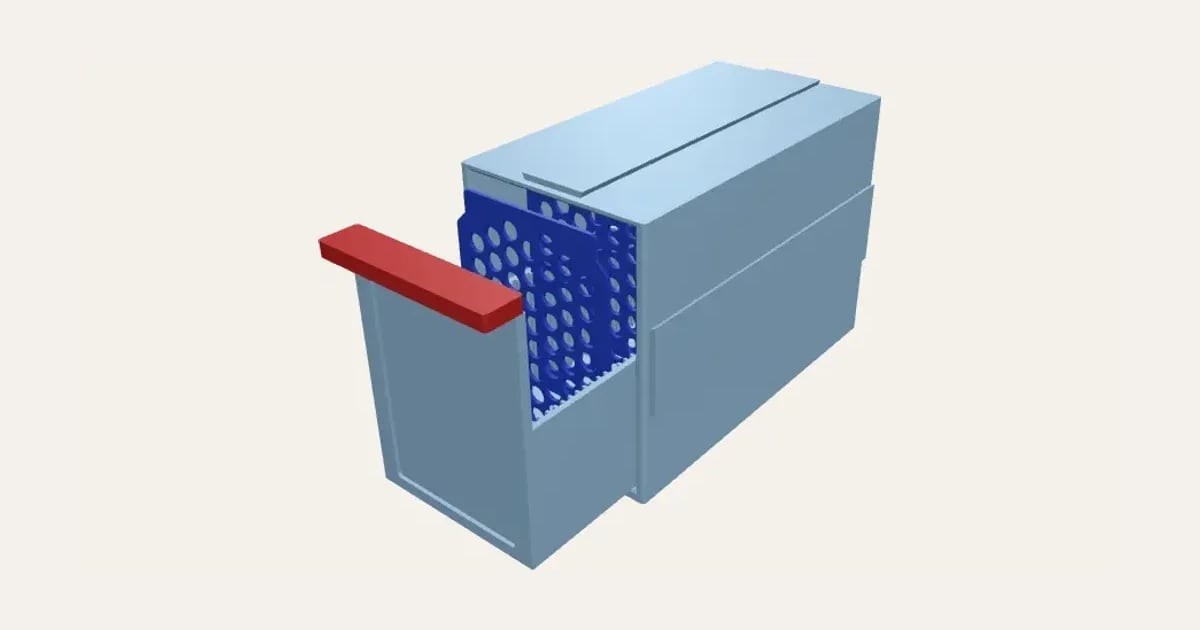
A sleeve and a drawer for your cards that stack and join side by side with dovetail rails, building a cabinet a drawer at a time. The drawer front holds a display card behind a window, under a slot-in handle with your words on it; ridged sides hold patterned dividers, and a stop keeps it in. Single or double-wide, sized for how many cards, sleeved, double-sleeved, bare or in toploaders, with a base, top cap, wall keyholes and a quick fit test. Prints with no supports.
Customise it in your browser, then download a print-ready STL, or a multi-colour 3MF. No CAD skills needed.
About the MTG Stackable Modular Storage System
A stackable storage system for your cards: a sleeve with a drawer that slides out, the cards standing up in it facing you. Slide your favourite card into the drawer front behind its window; each sleeve has a rail on top and a groove underneath, so they stack and lock in line. Sized for how many cards, sleeved or bare, Magic, Pokémon or Japanese size.
What you can change
- Type your own words across the dividers’ tops and words on the handle.
- Cards: sleeved, double-sleeved, bare, not sleeved and japanese size, sleeved, and 3 more.
- Print: everything: the sleeve, drawer, handle and dividers, just the sleeve, the drawer, its handle and dividers, just the dividers, A base, top cap and side cover for a stack and A quick test print, to check the fit.
- Fit: snug, normal and loose.
- Dividers’ pattern: honeycomb, circles, diamonds, slots and none.
- Font: 29 to choose from, from script to stencil.
- Display card in the drawer front: the whole card, in a thin frame, A smaller window and none.
- All 6 colours are yours to pick.
- Adjust how many cards, how many dividers, dividers’ text size and drawer sides as high as, and more.
- Turn on or off: two rows side by side, A stop, so the drawer can’t slide right out, ridges along the drawer’s sides, to hold dividers and dovetail rail on top and groove underneath, to stack them.
What you download
An STL for any slicer, and a 3MF with each colour as its own part, ready for an AMS or a filament change.
Printing it
The sleeve prints standing on its back, the drawer upright and the handle upside down; no supports. Print the fit test first: if the slice of drawer is tight in the slice of sleeve, or the grooves on the rails, choose Loose. Slide a card into the drawer front from the top, then push the handle’s tongue into the slot over it.
Ideas for using it
- A drawer per colour or set, stacked into a cabinet.
- Your Commander deck’s home, its commander in the window.
- Bulk storage that grows a drawer at a time.
- A drawer of trade binder overflow, labelled with a card in front.
Questions
How do they stack?
Each sleeve has a dovetail rail along its top and right side, and matching grooves underneath and in its left side: the next sleeve slides on from the front or back and can’t lift off, so you can build up and across. Turn them off to stand them loose.
Will the drawers slide smoothly?
They ride on two runners along the sleeve’s floor, with room all round, a chamfer round the drawer’s foot so the first layer can’t catch, and a lead-in round the opening. Print the fit test first (Print: a quick test print): if the slice of drawer is tight in the slice of sleeve, or the grooves on the rails, choose a looser fit.
Can the drawer fall out?
Not by accident: small bumps by the drawer’s back meet bumps just inside the sleeve’s opening, so it stops before it’s out. A firm pull takes it past them when you want it right out.
How do I finish a stack, or hang it up?
Print a base (with recesses for stick-on rubber feet), a top cap and a side cover: they slide onto the rails like another sleeve. Or turn on keyholes, and hang a sleeve on two screws.
Can I label the drawers?
Put words on the handle (raised in a second colour), slide a card into the window, and print the handles in different colours.
How many cards does a drawer hold?
As many as you set, up to what fits your printer: the sleeve prints standing on its back, so it can be no taller than your plate is wide.
Does it need supports?
No. The sleeve prints standing on its back, the drawer upright and the handle upside down. The handle’s tongue pushes into the slot at the top of the drawer front, over the display card, so it holds the card in; print handles in different colours to tell drawers apart.
Dividers?
Yes: ridges along the drawer’s sides hold dividers anywhere along it, patterned with honeycomb, circles, diamonds or slots, with your words raised across their tops (one each, in order). Set how many, and they print on a plate of their own beside the sleeve and drawer.
Do I need a multi-colour printer?
No. Print it in one colour, or in colours with a filament change: the Colours line under the 3D view says at which height to change. With an AMS or another multi-colour printer, the 3MF prints it in one go.
Which printers and slicers does it work with?
Any FDM printer. The STL opens in every slicer; the 3MF keeps the colours as separate parts in Bambu Studio, Orca Slicer, PrusaSlicer and Cura. Pick your printer in the designer to check it fits the plate.
Can I sell what I make?
On Pro and Ultimate you can sell the prints you make, for example on Etsy or at craft fairs, for as long as your membership is active: if it ends, stop selling them. On Free and Maker, print it for yourself or give it as a gift. The STL and 3MF files themselves are never for sharing or selling.
More Storage & organising
- Parametric Box
- Filament Swatches
- SKÅDIS Accessories
- Battery Organiser
- Game & Memory Card Holder
- Card Deck Box
- Toploader & Sleeve Desk Caddy
- Toploader & Sleeve Vertical Desk Caddy
- TCG Sorting Box Dividers
- Card Sorting Tray
- Scrying Stand – Card Scanning Tower for MTG, Pokémon & TCG
- Spool Hub Adapter
- Drawer Organiser
- Smart Drawer Organiser
- Jewellery Box with Sliding Lid