Filamora Studios › Storage & organising
TCG Sorting Box Dividers
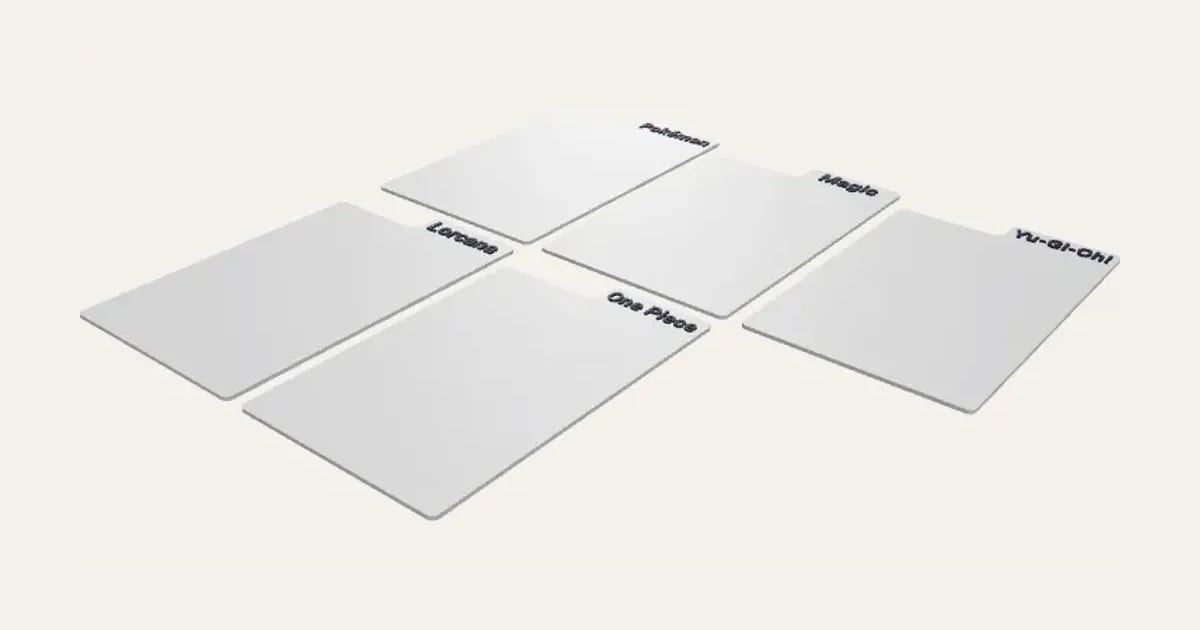
Dividers for a trading card sorting box, a tab above the cards with your words on it: a game, a set, a type or a letter. One for each name in your list, the tabs stepping across so each shows. Sized for sleeved, Japanese-size or toploaded cards, on their side or standing up; text raised, inlaid or engraved.
Customise it in your browser, then download a print-ready STL, or a multi-colour 3MF. No CAD skills needed.
About the TCG Sorting Box Dividers
Dividers for a card sorting box, sized to sleeved cards, Japanese-size cards or toploaders, with a tab above the cards and your words on it: a game, a set, a type, a brand or a letter. One for each name in your list, the tabs stepping across so every one shows. Prints flat in minutes.
What you can change
- Type your own header text.
- Make one, or a whole batch at once: paste a list of names and get one each.
- Font: 29 to choose from, from script to stencil.
- Sized for: sleeved cards standing up, sleeved cards on their side, japanese-size cards on their side, japanese-size cards standing up, toploaders on their side and toploaders standing up.
- Tabs: all on the right, all on the left, all in the middle and stepped across, so every one shows.
- Text: raised, in a second colour, inlaid flush, in a second colour and engraved.
- Pick the divider and text colours.
- Adjust text size, width, height and tab height, and more.
What you download
An STL for any slicer, and a 3MF with each colour as its own part, ready for an AMS or a filament change.
Printing it
Prints flat, no supports. For raised text, change filament where the text starts; inlaid text needs an AMS or similar.
Ideas for using it
- A divider for each game in a bulk box: Pokémon, Magic, Yu-Gi-Oh!, Lorcana, One Piece.
- Pokémon types or Magic colours, to sort a collection.
- A to Z, for a binder-free collection or a shop’s singles box.
- Each set’s name, for a box of sealed or sorted cards.
Questions
Will they fit my box?
Pick what the box holds and how the cards stand (on their side or standing up), or type the width and height yourself. They’re a little over a sleeved card, with the tab standing above it.
Can I make several of one?
Yes: write “Pokémon x3” in the list for three, or choose copies of each, or fill the plate.
Raised, inlaid or engraved?
Raised text needs one filament change where the text starts. Inlaid text is flush, so nothing catches as you flick through, but needs an AMS or similar. Engraved is one colour.
Do I need a multi-colour printer?
No. Print it in one colour, or in colours with a filament change: the Colours line under the 3D view says at which height to change. With an AMS or another multi-colour printer, the 3MF prints it in one go.
Which printers and slicers does it work with?
Any FDM printer. The STL opens in every slicer; the 3MF keeps the colours as separate parts in Bambu Studio, Orca Slicer, PrusaSlicer and Cura. Pick your printer in the designer to check it fits the plate.
Can I sell what I make?
On Pro and Ultimate you can sell the prints you make, for example on Etsy or at craft fairs, for as long as your membership is active: if it ends, stop selling them. On Free and Maker, print it for yourself or give it as a gift. The STL and 3MF files themselves are never for sharing or selling.
More Storage & organising
- Parametric Box
- Filament Swatches
- SKÅDIS Accessories
- Battery Organiser
- Game & Memory Card Holder
- Card Deck Box
- Toploader & Sleeve Desk Caddy
- Toploader & Sleeve Vertical Desk Caddy
- Card Sorting Tray
- MTG Stackable Modular Storage System
- Scrying Stand – Card Scanning Tower for MTG, Pokémon & TCG
- Spool Hub Adapter
- Drawer Organiser
- Smart Drawer Organiser
- Jewellery Box with Sliding Lid