Filamora Studios › Storage & organising
Filament Swatches
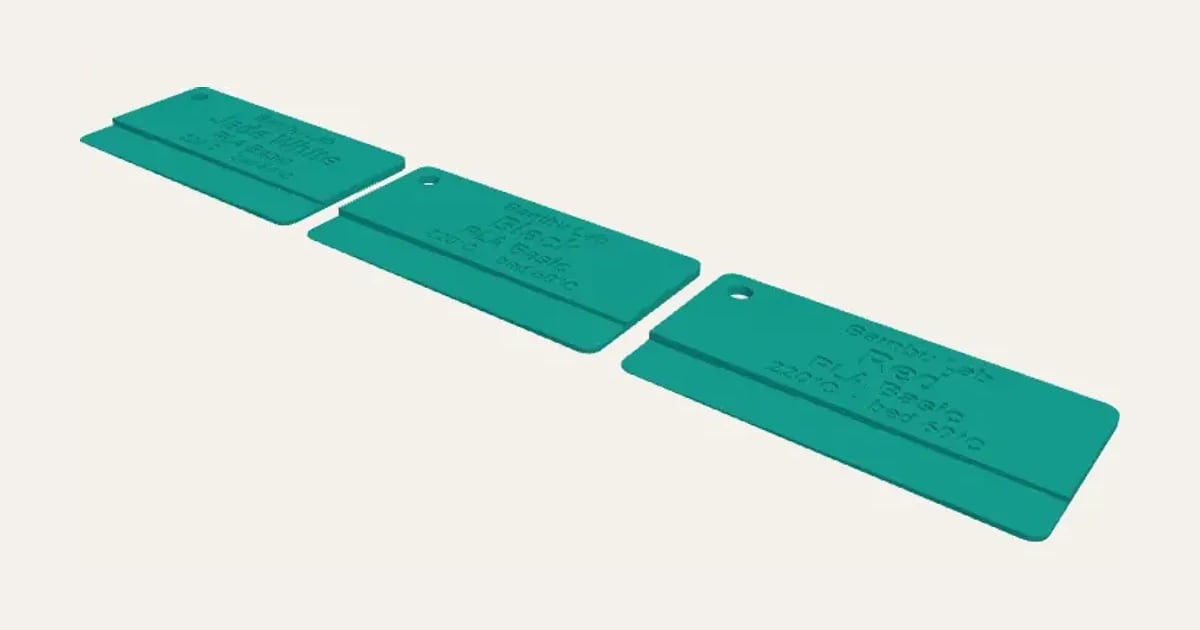
Swatch cards printed in each filament, with brand, material, colour and temperatures engraved, a 0.2–1 mm see-through strip and a ring hole.
Customise it in your browser, then download a print-ready STL, or a multi-colour 3MF. No CAD skills needed.
About the Filament Swatches
Filament swatch cards printed in each of your filaments, with the brand, material, colour and temperatures engraved, and a see-through strip that steps from 0.2 to 1 mm so you can see how it looks thin. A ring hole to keep the set together.
What you can change
- Type your own colours, brand, material, nozzle temperature and bed temperature.
- Font: 26 to choose from, from script to stencil.
- Pick the preview colour.
- Adjust card width, card height and card thickness.
- Turn on or off: see-through steps and ring hole.
Size
About 75 × 40 × 2 mm (width × depth × height), one piece at the starting settings.
What you download
An STL or 3MF for any slicer.
Printing it
About 17 g of PLA and about 1 hour 10 minutes to print, one piece at the starting settings (15% infill, 2 walls, 0.2 mm layers, on a Bambu Lab A1). Your slicer gives the exact figures for your printer and settings.
Ideas for using it
- Print one from every new spool and keep them on a ring by the printer.
- Choose colours for a multi-colour print by holding the swatches together.
- Note the temperatures that worked, so you don’t have to look them up again.
- Use the thin steps to pick a filament for a lithophane or a lamp.
Questions
What size is it?
About 75 × 40 × 2 mm (width × depth × height), one piece at the starting settings. Every size is a setting, so make it as big or small as you need.
Which printers and slicers does it work with?
Any FDM printer. The STL opens in every slicer; the 3MF keeps the colours as separate parts in Bambu Studio, Orca Slicer, PrusaSlicer and Cura. Pick your printer in the designer to check it fits the plate.
Can I sell what I make?
On Pro and Ultimate you can sell the prints you make, for example on Etsy or at craft fairs. On Free and Maker, print it for yourself or give it as a gift. The STL and 3MF files themselves are never for sharing or selling.