Filamora Studios › Paper printables
Sound Wave Print
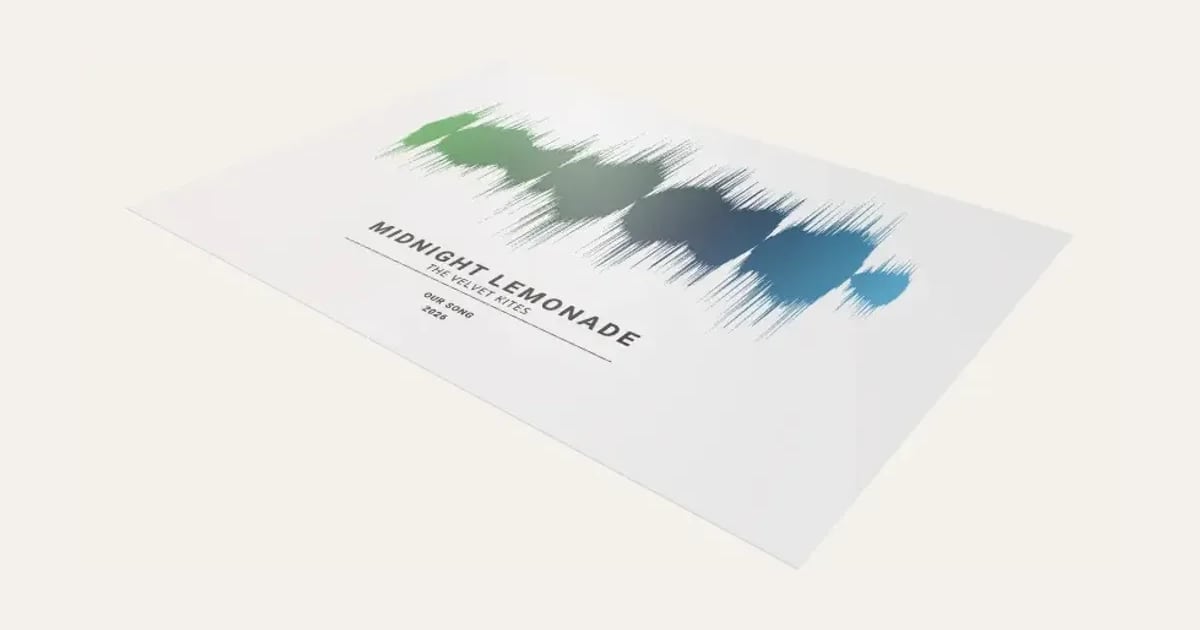
The sound wave of your song or a voice message, drawn from the sound itself as bars, a solid wave or a ring, fading from one colour to another, with the song's title, who sang it and the year under it.
Customise it in your browser, then download a print-ready PDF to print at home. No design skills needed.
About the Sound Wave Print
A sound wave print: the sound wave of your song, a first dance or the song that’s yours, or of a voice message, drawn as bars, a solid wave or a ring, in one colour or fading from one to another, with the song’s title, who sang it and a couple of small lines (Our song, the year) under it. A wedding, anniversary or memorial print to frame.
What you can change
- Type your own song title, sung by, A small line, and another, song link for a QR code and words under the QR code.
- Use your own song or voice message (pick a sound file or record one): only the shape of its sound wave is kept.
- QR code: bottom right and bottom left.
- Wave: bars, mirrored, solid wave, bars on a line and A ring.
- Title and small lines font: 35 to choose from, from script to stencil.
- Sung by font: 35 to choose from, from script to stencil.
- Print size: A4, A3, A2, 8 × 10 in, 11 × 14 in and 12 × 16 in.
- Orientation: landscape and portrait.
- Colours in the fade: two, three and four.
- All 6 colours are yours to pick.
- Adjust wave height and quiet parts.
- Turn on or off: A fine line under the words, title in capitals and wave fades from colour to colour.
What you download
A PDF to print on paper or card and cut out.
Printing it
Print at 100% on matt photo paper or card and frame it. Pick the song from your computer or phone (an MP3 or M4A you own, or a voice note), or record a message here: it's read in your browser and only the shape of the wave is kept, never the sound. The song's title and singer are yours to add: a print for your own home is fine, but don't sell prints with someone else's song and name on them.
Questions
Is it really my song’s wave?
Yes: pick the song from your computer or phone (an MP3, M4A or WAV you own) and its wave is drawn from the sound itself, quiet parts low and loud parts tall.
Can I use a voice message?
Yes: pick a voice note you’ve saved, or record a message of up to a minute right here. A loved one saying “I love you” makes a lovely keepsake.
Is my sound uploaded?
No. It’s read in your browser and only the shape of the wave is kept, a few hundred heights, never the sound.
Can I add a link to the song?
Yes: paste a YouTube or Spotify link and a QR code goes beside the words, so anyone can scan the print with their phone and play the song. Short share links make bigger, easier squares; scan it before you print.
Can I sell prints of songs?
Make them for your own home or as a gift. Song titles and singers’ names belong to others, so don’t sell prints of someone else’s song.
Can I sell what I make?
On Pro and Ultimate you can sell the prints you make, for example on Etsy or at craft fairs, for as long as your membership is active: if it ends, stop selling them. On Free and Maker, print it for yourself or give it as a gift. The PDF itself is never for sharing or selling.
More Paper printables
- E-reader Case Insert
- Phone Case Insert
- Tablet Case Insert
- Definition Print
- Family Tree Print
- Letter Tile Family Print
- Gift Ticket
- Scratch to Reveal Card
- Calendar Print
- Coordinates Print
- Subway Word Art
- Star Map
- Map Print
- City Map Poster
- Cocktail Print
- Nursery Animal Print
- Street Card Print
- Family Print
- Text Poster
- Birth Stats Poster
- Picture Bookmarks
- Labels & Tags
- Reading Tracker
- Reward Chart
- Name Colouring & Tracing
- Room Word Search Print
- Word Search
- Birth Announcement Print
- Letter from Santa
- Moon Phase Print
- Race Route Print
- Family Recipe Print
- Pet House Rules Print
- Our Story Timeline
- Our Song Player Print
- Song Lyric Record Print
- New Home Print
- Our First Christmas Print
- Our Year Print
- Pet Profile Print
- Fan Stats Print
- Words in a Heart Print
- New Home Key Print
- Reasons We Love You Print
- Bucket List Print
- Baby's First Year Print
- Christmas Eve Box Labels
- Star Sign Print
- Home Café Menu Print
- Kitchen Conversion Chart
- Birth Flower Family Print
- Game Night Score Pads
- Weekly Meal Planner
- Family Chore Chart
- Height Chart
- Personalised Wrapping Paper
- Christmas Bingo Cards
- Secret Santa Cards
- Coupon Book
- Years Together Print
- Pet Adoption Certificate
- Bottle Labels
- Christmas Activity Placemat
- New Year's Resolutions Print
- Advent Activity Calendar
- Greeting Card