Filamora Studios › Paper printables
Cocktail Print
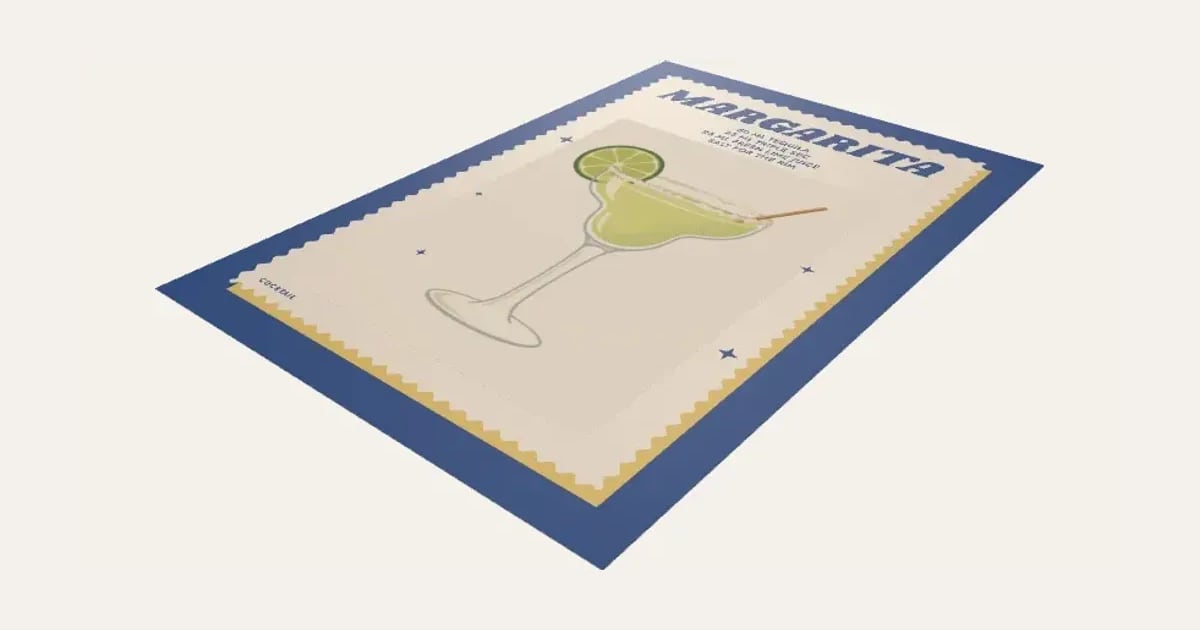
A retro cocktail print: the drink drawn in a 1970s print style on a card with a wavy edge, its name in groovy lettering and the recipe over it. A Margarita, Espresso Martini, Aperol Spritz, Negroni and more, each with its own colours, or name it after someone and write your own recipe. To print and frame.
Customise it in your browser, then download a print-ready PDF to print at home. No design skills needed.
About the Cocktail Print
A retro cocktail print for the kitchen or the bar cart: the drink drawn in a 1970s print style on a card with a wavy edge, its name in groovy lettering and the recipe over it. Pick a Margarita, Espresso Martini, Aperol Spritz, Negroni, Mojito and more, then make it yours: name it after someone, change the recipe, or pick your own colours. To print and frame.
What you can change
- Type your own name, word in script with it and recipe.
- Drink: margarita, espresso Martini, aperol Spritz and negroni, and 22 more.
- Name goes: at the top and at the bottom.
- Name font: 29 to choose from, from script to stencil.
- Script font: 29 to choose from, from script to stencil.
- Recipe font: 29 to choose from, from script to stencil.
- Print size: A4, A3, A5, 8 × 10 in and 11 × 14 in.
- All 6 colours are yours to pick.
- Turn on or off: wavy edge on the card, sparkles round the drink and COCKTAIL in the corner.
What you download
A PDF to print on paper or card and cut out.
Printing it
Print at 100% on matt paper or card and frame it, or use the picture download (300 or 600 dpi) for a print shop. Pick a drink from the buttons at the top for its drawing, name, recipe and colours, then make it yours: rename it after someone (The Rosa), change the recipe or the colours. A set of three or four looks great on a bar cart.
Questions
Can I name the cocktail after someone?
Yes. Change the name and the script word to anything (The Rosa, Daiquiri Please, Our Wedding Spritz) and write your own recipe, a line at a time.
Can I change the colours?
Every drink starts with its own colours, and you can change any of them: the page, the colour behind the card, the card, the name, the script word and the recipe. The drawing takes the card’s colour, like ink printed on it.
How do I print it?
Print at 100% on matt paper or card and frame it, or download the picture at 300 or 600 dpi for a print shop. A set of three or four in matching frames looks great together.
Can I sell what I make?
On Pro and Ultimate you can sell the prints you make, for example on Etsy or at craft fairs, for as long as your membership is active: if it ends, stop selling them. On Free and Maker, print it for yourself or give it as a gift. The PDF itself is never for sharing or selling.
More Paper printables
- Kindle Insert
- Phone Case Insert
- Tablet Case Insert
- Definition Print
- Family Tree Print
- Letter Tile Family Print
- Gift Ticket
- Scratch to Reveal Card
- Calendar Print
- Coordinates Print
- Subway Word Art
- Star Map
- Map Print
- City Map Poster
- Nursery Animal Print
- Street Card Print
- Family Print
- Text Poster
- Birth Stats Poster
- Picture Bookmarks
- Labels & Tags
- Reading Tracker
- Reward Chart
- Name Colouring & Tracing
- Word Search
- Birth Announcement Print
- Letter from Santa
- Moon Phase Print
- Race Route Print
- Family Recipe Print
- Pet House Rules Print
- Our Story Timeline
- Song Lyric Record Print
- New Home Print
- Our First Christmas Print
- Our Year Print
- Pet Profile Print
- Fan Stats Print
- Words in a Heart Print
- New Home Key Print
- Reasons We Love You Print
- Bucket List Print
- Baby's First Year Print
- Christmas Eve Box Labels
- Personalised Wrapping Paper
- Christmas Bingo Cards
- Secret Santa Cards
- Coupon Book
- Years Together Print
- Pet Adoption Certificate
- Bottle Labels
- Christmas Activity Placemat
- New Year's Resolutions Print
- Advent Activity Calendar