Filamora Studios › Toys & fidgets
Audio Figure Shelf
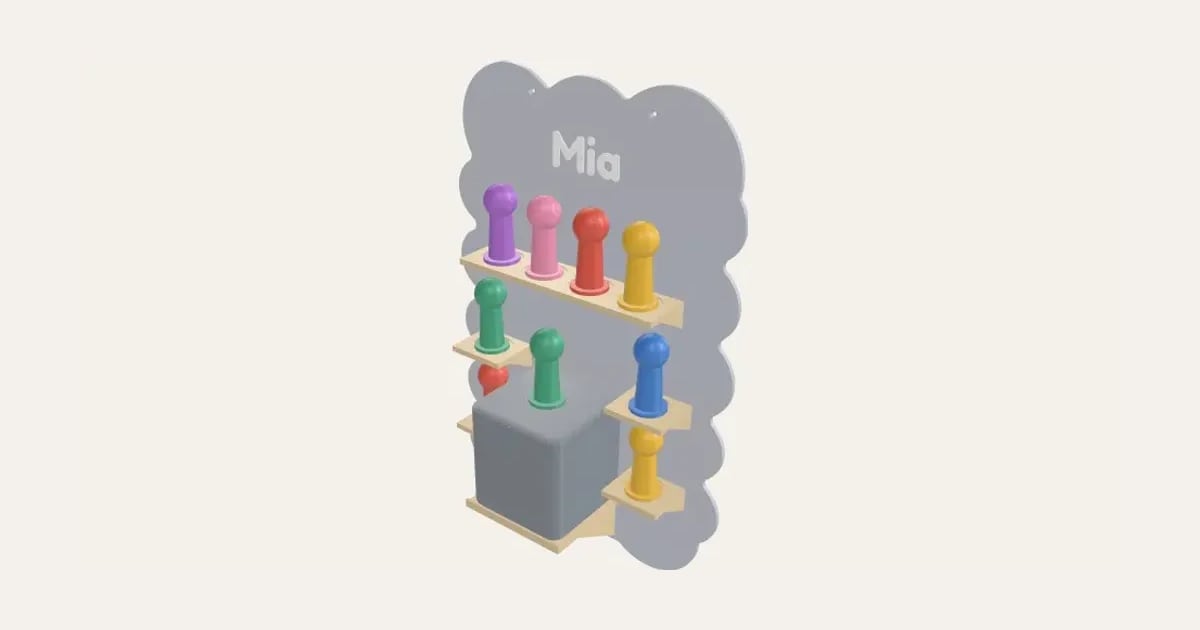
A wall board for audio figures (fits Tonies figures): a cloud, house, castle or rocket with ledges, a platform for the player and a name, or a big initial with ledges up its strokes. Or a stepped shelf for a desk. Pockets for steel washers so the figures’ magnets hold.
Customise it in your browser, then download a print-ready STL, or a multi-colour 3MF. No CAD skills needed.
About the Audio Figure Shelf
A display for audio figures (it fits Tonies figures), in two styles. A wall board shaped like a cloud, a house, a castle or a rocket, with ledges for the figures, a platform at the bottom for the player (with room for the figure on top) and their name in raised letters; or a big letter, their initial, with ledges up its strokes. Or a stepped shelf for a desk, rows rising like theatre seats, with a bay beside it for the player. Pockets under the figures’ spots take steel washers, so the magnets in their bases hold them.
What you can change
- Type your own name.
- Style: wall board, with ledges and stepped shelf, for a desk or shelf.
- Shape: cloud, house, castle, rocket, rounded board and big letter.
- Font: 35 to choose from, from script to stencil.
- Pick the main, ledges and platform and name colours.
- Adjust name height, player, across, player, front to back and player, tall, and more.
- Turn on or off: platform for the audio player, A slot at the back for the charging cable and pockets for steel washers.
Size
About 35 × 12.7 × 53.8 cm (width × depth × height), one piece at the starting settings.
What you download
An STL for any slicer, and a 3MF with each colour as its own part, ready for an AMS or a filament change.
Printing it
About 654 g of PLA and about 36 hours 30 minutes to print, one piece at the starting settings (15% infill, 2 walls, 0.2 mm layers, on a Bambu Lab A1). Your slicer gives the exact figures for your printer and settings.
Wall board: prints lying on its back, the ledges standing up, with no supports. A board taller than your print bed comes in pieces: glue the jigsaw tabs together (superglue or epoxy) and screw each piece to the wall. The name and ledges in their own colours need an AMS (or print it all in one colour). With washer pockets, add one pause at the height the designer shows and drop a 25 mm steel washer (up to 2 mm thick) into every pocket. Stepped shelf: prints as it sits, a pause for each row’s washers. Low infill (10–15%) keeps it light; 3 walls make the ledges stiff.
Ideas for using it
- A child’s Tonies collection on a shelf.
- Beside the speaker on the bedside table.
- On the nursery wall.
- Their initial on the bedroom wall, filled with figures.
Questions
How do the washers go in?
Add a pause in your slicer at the height the designer shows, drop a 25 mm steel washer into each pocket, and resume: the layers above seal them in. On the wall board every pocket closes at the same height, so it’s one pause; the stepped shelf has one for each row.
Will the wall board fit my printer?
It prints lying on its back. If it’s taller than your print bed it comes in pieces, cut between the ledges, with jigsaw tabs you glue together. Each piece has its own screw holes. If it’s too wide, the designer says so: try fewer figures in each row.
How are the ledges placed on a letter?
Wherever a stroke is wide enough for at least one figure, a level at a time up the letter, each a figure’s height above the last. Thick fonts and taller letters fit more; the designer says if a letter has no room.
Will my player fit the platform?
Measure it and set its size (its height on its charging station, if it sits on one): the platform is made to match, with a little room to spare, a lip along the front, and room above it for a figure standing on top. A slot at the back lets the charging cable drop down behind it.
Is it a Tonies product?
No: it’s our own shelf, sized to fit Tonies figures. Tonies is a trademark of its owners.
Do I need a multi-colour printer?
No. Print it in one colour, or in colours with a filament change: the Colours line under the 3D view says at which height to change. With an AMS or another multi-colour printer, the 3MF prints it in one go.
Which printers and slicers does it work with?
Any FDM printer. The STL opens in every slicer; the 3MF keeps the colours as separate parts in Bambu Studio, Orca Slicer, PrusaSlicer and Cura. Pick your printer in the designer to check it fits the plate.
My 3MF opens all grey in Bambu Studio. What do I do?
Download the 3MF again: files made before 3 November 2026 open in one colour in Bambu Studio 2.9 and later. A new one brings its colours, and Bambu Studio asks you to match each to one of your filaments. With an older file, File → Import → Import 3D Models (Ctrl+I) often keeps the colours, or select each part and press 1, 2, 3… to put it on that filament.
Can I sell what I make?
On Pro and Ultimate you can sell the prints you make, for example on Etsy or at craft fairs, for as long as your membership is active: if it ends, stop selling them. On Free and Maker, print it for yourself or give it as a gift. The STL and 3MF files themselves are never for sharing or selling.
More Toys & fidgets
- Flexi Name Critter
- Flexi Keyring
- Fidget Spinner
- Spinner Ring
- Infinity Cube
- Keyboard Fidget Keychain
- Impossible Passthrough
- Dumpling Clicker
- Ice Cream Clicker
- Animal Clicker
- Halloween Clicker
- Clicker Display Stand
- Clicker Gift Box
- Dice Tower
- Valentine's Clicker
- Easter Clicker
- Kids' Bike Plate
- Noughts and Crosses Travel Set
- Stacking Name Blocks
- Personalised Dice and Tray
- Spinning Top