Filamora Studios › Toys & fidgets
Capsule Vending Machine
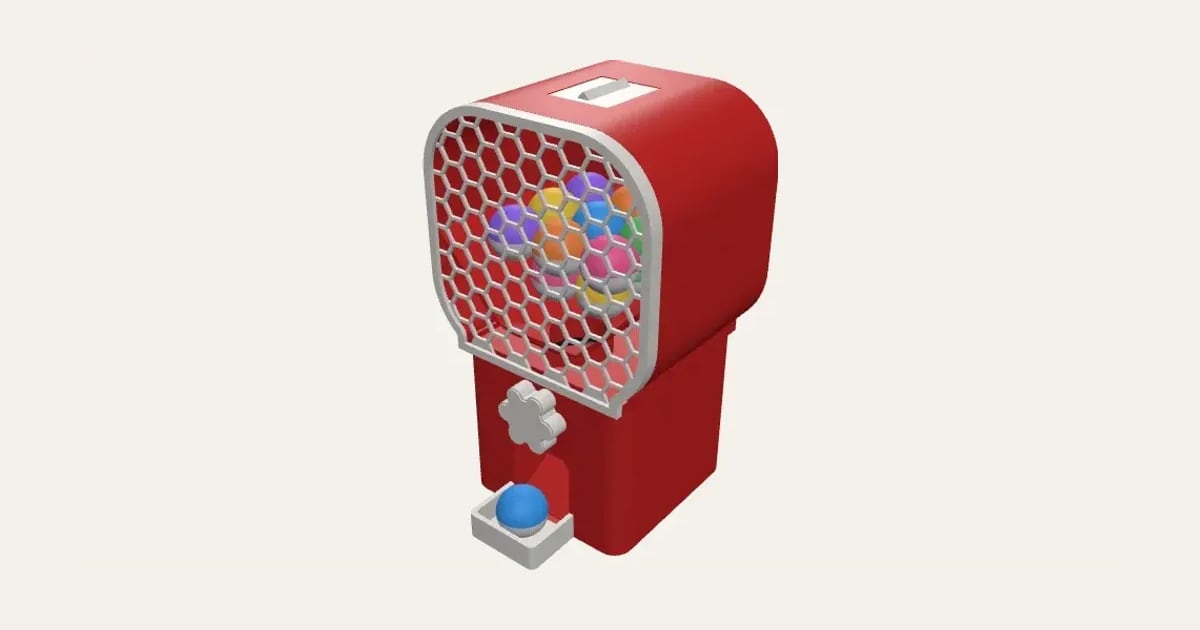
Fill the hopper with capsules, turn the knob, and one drops out into the cup at the front: a drum with two pockets turns under the hopper and clicks every half turn. Sized to your capsules (28, 32, 45, 50 mm or anything between), with a printed screen in honeycomb, hearts, stars and more, or a window for a clear sheet. No supports, no screws.
Customise it in your browser, then download a print-ready STL, or a multi-colour 3MF. No CAD skills needed.
About the Capsule Vending Machine
A capsule vending machine: fill the hopper with capsules, turn the knob, and one drops out into the cup at the front. A drum with two pockets turns under the hopper and clicks every half turn. Sized to your capsules, from 28 to 50 mm, with a printed screen in honeycomb, hearts, stars and more, or a window for a clear sheet. No supports, no screws.
What you can change
- Drum: compact: a turn a capsule, a shorter base and classic: half a turn a capsule.
- Body width: slim, regular and wide.
- Hopper shape: rounded square, round, arch and square.
- Hopper width: as wide as the body, A bit wider and much wider.
- Hopper window: printed screen and clear plastic sheet.
- Screen pattern: honeycomb, circles, hearts, stars, diamonds and plain.
- Logo on the screen: none, raised on a badge, engraved in a badge and solid in the pattern, raised.
- Knob: flower, round, knurled, star, dial with an S grip, T-bar and crank handle.
- Rim round the knob: none, thin ring, wide bezel and scalloped bezel.
- Click: ratchet, turns clockwise only, ratchet, turns both ways and keyboard switch.
- Texture: none, ribbed, lines and tiles, and 3 more.
- All 5 colours are yours to pick.
- Adjust capsule size, front corner rounding and hopper height.
Size
About 15.2 × 15.4 × 27.5 cm (width × depth × height), one piece at the starting settings.
What you download
An STL for any slicer, and a 3MF with each colour as its own part, ready for an AMS or a filament change.
Printing it
About 649 g of PLA and about 36 hours 10 minutes to print, one piece at the starting settings (15% infill, 2 walls, 0.2 mm layers, on a Bambu Lab A1). Your slicer gives the exact figures for your printer and settings.
Every part prints without supports: the cabinet the right way up, the hopper, drum and housing standing on their backs, the bezel and switch bracket on their faces, the knob on its back, the shaft standing up, the filler neck on its rim, its cap on its top and the screen flat. To put it together, push the drum into the housing (its socket to the open front), drop the housing into the cabinet against the front wall, push the square shaft through the front into the drum and the knob onto it; a dab of glue at each end keeps them there. Sit the hopper on the cabinet, lay the screen (or a clear sheet cut round the PDF's outline) against its front and push the bezel on over it. Glue the filler neck into the hole in the top (its point to the front) and fill it through there; the cap screws on clockwise. Set the capsule size a millimetre over your capsules (across the ring where their halves meet), as they vary. The ratchet turns clockwise; to take the knob off, turn it anticlockwise and the shaft unscrews from the drum. For the keyboard switch, clip a clicky MX-style switch (a Blue, say) into its bracket and push the bracket into the window in the back of the drum housing.
Ideas for using it
- Fill it with small printed toys or clickers for a gashapon at home.
- A treat or sweet dispenser at a party.
- A reward machine for jobs done or good behaviour.
- A prize machine for a craft fair stand.
No printer? Buy it printed in our shop
Read: Meet the bonbon vending machine
Questions
What size is it?
About 15.2 × 15.4 × 27.5 cm (width × depth × height), one piece at the starting settings. Every size is a setting, so make it as big or small as you need.
Do I need a multi-colour printer?
No. Print it in one colour, or in colours with a filament change: the Colours line under the 3D view says at which height to change. With an AMS or another multi-colour printer, the 3MF prints it in one go.
Which printers and slicers does it work with?
Any FDM printer. The STL opens in every slicer; the 3MF keeps the colours as separate parts in Bambu Studio, Orca Slicer, PrusaSlicer and Cura. Pick your printer in the designer to check it fits the plate.
No 3D printer? Can you print it for me?
Yes. Buy it printed from our shop, with your names and colours from the designer, made to order in our UK studio.
Can I sell what I make?
On Pro and Ultimate you can sell the prints you make, for example on Etsy or at craft fairs. On Free and Maker, print it for yourself or give it as a gift. The STL and 3MF files themselves are never for sharing or selling.
More Toys & fidgets
- Flexi Name Critter
- Flexi Keyring
- Fidget Spinner
- Spinner Ring
- Infinity Cube
- Keyboard Fidget Keychain
- Impossible Passthrough
- Dumpling Clicker
- Ice Cream Clicker
- Animal Clicker
- Halloween Clicker
- Clicker Display Stand
- Clicker Gift Box
- Dice Tower
- Valentine's Clicker
- Easter Clicker
- Kids' Bike Plate
- Noughts and Crosses Travel Set