Filamora Studios › Desk & gadgets
Under-desk Drawer
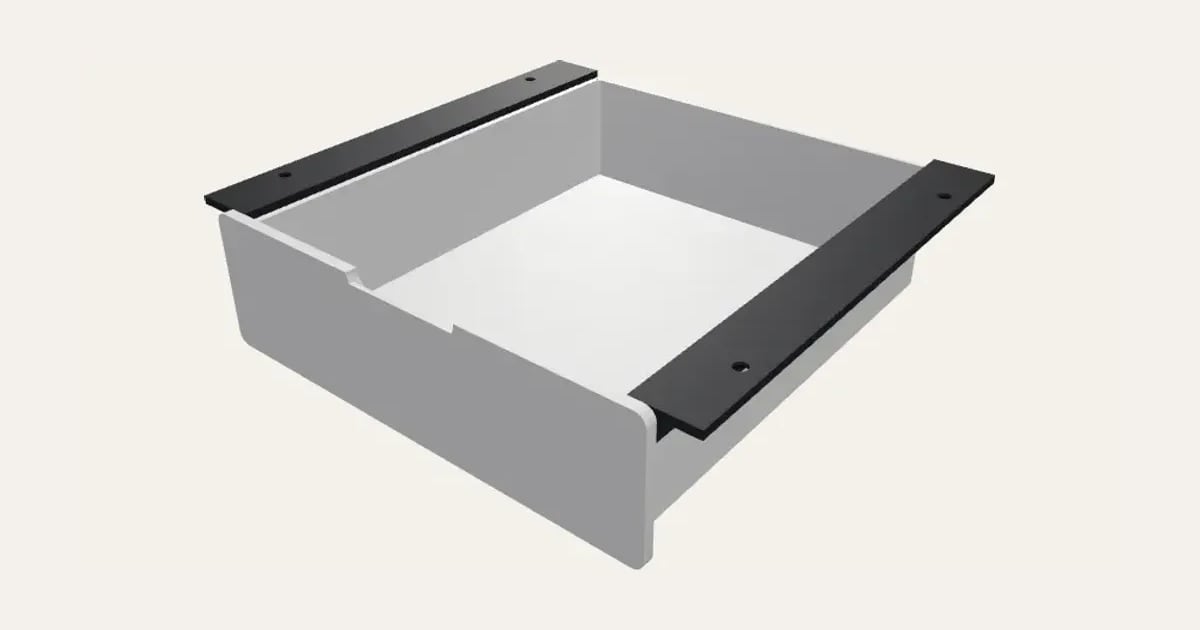
A drawer that slides on two rails screwed up under your desk, its top edges riding on 45° lips so it runs straight and every part prints without supports. Sized inside to what you'll keep in it.
Customise it in your browser, then download a print-ready STL, or a multi-colour 3MF. No CAD skills needed.
About the Under-desk Drawer
An under-desk drawer that slides on two rails screwed up under the desk. Its top edges ride on 45° lips so it runs straight, and every part prints without supports. You give it the inside size you need and it builds the drawer and rails round that.
What you can change
- Pick the drawer and rails colours.
- Adjust inside width, inside depth, inside height and screw size.
Size
About 19.8 × 18.3 × 5 cm (width × depth × height), one piece at the starting settings.
What you download
An STL for any slicer, and a 3MF with each colour as its own part, ready for an AMS or a filament change.
Printing it
About 162 g of PLA and about 9 hours 10 minutes to print, one piece at the starting settings (15% infill, 2 walls, 0.2 mm layers, on a Bambu Lab A1). Your slicer gives the exact figures for your printer and settings.
Every part prints without supports: the drawer the right way up, the rails upside down with their screw plates on the bed. Screw the rails up under the desk, the drawer slid in between them so they're the right distance apart, with 3 or 4 mm wood screws.
Ideas for using it
- Add a drawer to a desk or table that doesn’t have one.
- Hide a keyboard, notebook or controller under a gaming desk.
- A drawer under a workbench for the tools you use most.
- Somewhere for remotes and chargers under a coffee table or bedside table.
Questions
What size is it?
About 19.8 × 18.3 × 5 cm (width × depth × height), one piece at the starting settings. Every size is a setting, so make it as big or small as you need.
Do I need a multi-colour printer?
No. Print it in one colour, or in colours with a filament change: the Colours line under the 3D view says at which height to change. With an AMS or another multi-colour printer, the 3MF prints it in one go.
Which printers and slicers does it work with?
Any FDM printer. The STL opens in every slicer; the 3MF keeps the colours as separate parts in Bambu Studio, Orca Slicer, PrusaSlicer and Cura. Pick your printer in the designer to check it fits the plate.
Can I sell what I make?
On Pro and Ultimate you can sell the prints you make, for example on Etsy or at craft fairs. On Free and Maker, print it for yourself or give it as a gift. The STL and 3MF files themselves are never for sharing or selling.